Chapter 5 - The AI video prompt stack
In AI video generation, every polished scene begins as a single sentence: “A detective enters a dark room.” That line is the initial scene sentence; the rest of the prompt is used for visual control.
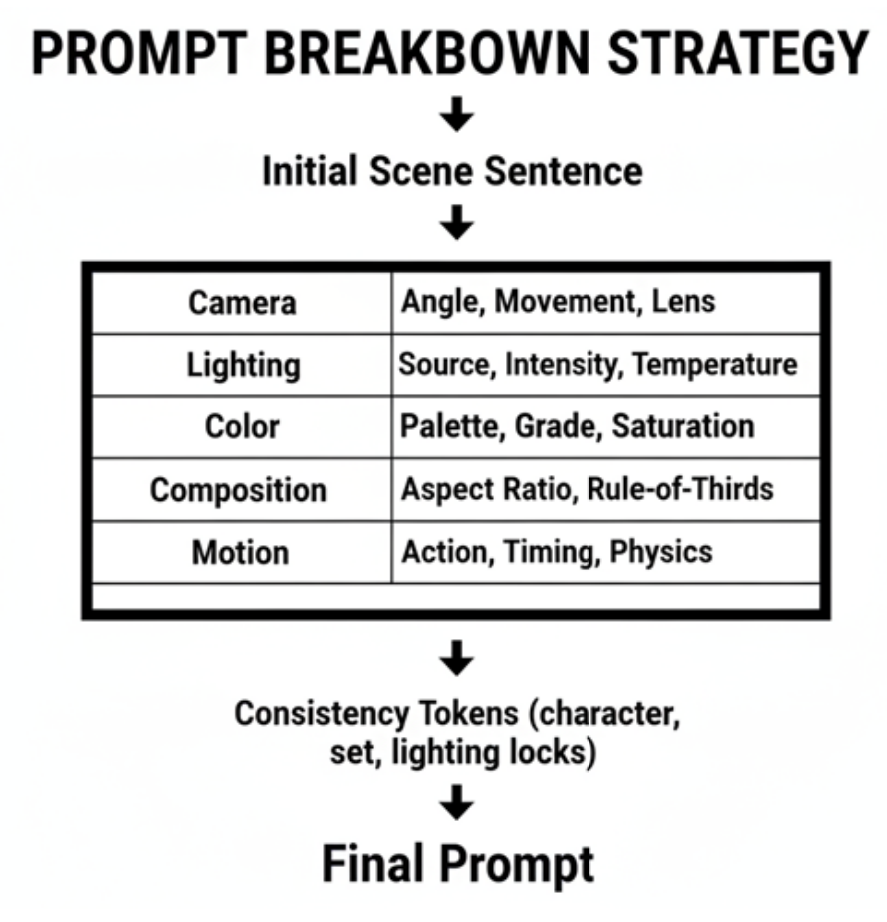
The initial scene sentence defines what you want to see, it specifies the character(s), the scene and the action. It acts as the foundation for every creative decision that follows, anchoring the AI’s output to a predictable starting point. By carefully crafting this sentence, you can ensure that each iteration of your video remains consistent, even as you experiment with different camera angles, lighting setups, or actions.
The visual control part is made up from five controllable layers: camera (angle, lens, motion), lighting (source, color, intensity), color (saturation, contrast, grading), composition (ratio, placement, motion timing) and motion (action, timing, physics). Each choice shapes the mood and clarity.
To keep these choices consistent across the frames or iterations, “locks” are used: character, set, and lighting tokens that prevent drift. A locked prompt ensures the detective’s coat, the room’s peeling wallpaper, and the blue key light stay identical in every render. When we mention “locked” in the prompt, it actually refers to a fixed set of keywords to be substituted into the prompt.
After all the layers and all the “locks” have been applied, the initial scene sentence will transform into a fully specified AI video generation prompt designed for AI video models. For example:
“A detective enters a dark room. use low-angle pan, wide lens, cold directional light source, desaturated, high-contrast, 16:9, slow-motion entry”
This transition turns the initial scene sentence into a production-ready blueprint ready for AI rendering.
In the following chapters, you will learn all the fine details on how to craft professional AI video generation prompts. Let your journey begin.