Chapter 7 - Lighting
Wes Anderson
Lighting is one of the most important aspects of visual storytelling. In AI video generation, the way you describe lighting in your prompt directly affects mood, emotion, and realism. This chapter provides clear, structured guidelines for lighting with examples so you can design powerful prompts.
Whether you want thriller-level edge or romance-level coziness, nailing lighting prompts is straightforward with the following modular setup, that shows you how to build one layer at a time. If you follow this structure, your shadows and hues actually advance the plot, instead of just leaving the AI scratching its digital head.
Quick-start syntax
Structure for lighting prompts:
lighting [intensity/type][angle][tone][source][time]
All fields are optional. Omitting any term keeps the default value for that parameter.
Lighting intensity
The strength of your light determines how the scene feels, whether sharp and dramatic or soft and romantic. Light intensity in AI prompts is less about brightness and more about shadow quality. Setting the right hardness or softness is the first step to shaping a mood that matches your story.
Lighting intensity affects the sharpness of shadows, the clarity of details, and the mood of the scene. In other words, light intensity is about shadow hardness more than wattage. Choose "hard" for crisp, dramatic shadows; choose "soft" for gentle, forgiving gradients or simply use "natural"
| Lighting intensity | ||
|---|---|---|
| Keyword | What it does | Prompt example |
| hard light | Creates sharp, defined shadows and high contrast | Cinematic close-up, hard light at 45° creating deep shadows on face |
| soft light | Wraps the subject in diffuse, low-contrast light | Soft, wrap-around beauty light with no harsh shadows, creamy skin |
| natural light | Simulates sunlight or ambient outdoor lighting, often directional with warm or cool tones depending on time of day | Outdoor portrait in natural light during golden hour, soft shadows and warm glow on skin |
Table 7.1 – Lighting intensity keywords
Lighting angle
Where the light strikes the subject changes everything. A small shift in angle can transform a neutral shot into one that feels mysterious, menacing, or intimate. By defining the lighting angle in your prompt, you override the AI’s default lighting and take full control over emotion and texture. Add the angle keyword to your prompt exactly as shown in the table below to override the AI’s default front light.
| Lighting angle | ||
|---|---|---|
| Keyword | Effect & Use Case | Prompt example |
| top lighting | Mysterious, fashion, interrogation scenes | Top-down hard light, deep eye shadows, film-noir style |
| back lighting | Rim light, silhouettes, dreamy halos | Golden hour back-light, rim glow around hair, soft lens flare |
| side lighting | Drama, split face, reveals texture | 90° side light, half-lit face, chiaroscuro |
| under lighting | Horror, unsettling, camp-fire vibe | Creepy under-light from flashlight, upward shadows |
| edge lighting | Accentuates outline, separates subject from BG | Thin white edge light, subject pops on dark background |
| overcast lighting | Soft, even, no shadows, perfect for beauty or rain scenes | Soft overcast sky, diffused daylight, no shadows on skin |
Table 7.2 – Lighting angle keywords
In traditional movies lighting angles are also affected by the type of lighting equipment used on the set. To achieve better results, you may also name the lighting equipment in your AI prompts.
The key light is provided by the primary lighting equipment. These can be: Fresnel, Led or HMI lamps
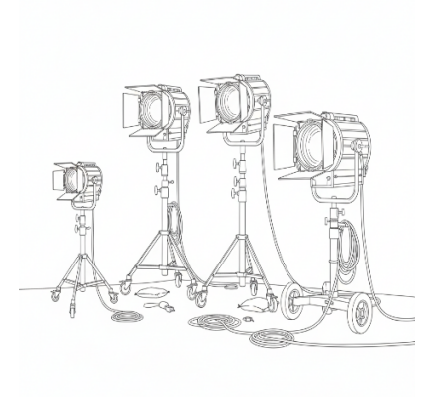
Fresnel Lights: Versatile lights with a lens that allows adjustment of beam focus. Common in studio and location setups.
LED Panels: Lightweight, energy-efficient, often dimmable and color-adjustable. Great for on-set flexibility and small crews.
HMI (Hydrargyrum Medium-arc Iodide) Lights: High-intensity, daylight-balanced lights used for outdoor or bright interior scenes.
These primary light sources are complimented by fill lights, that reduce shadows created by the key light and soften contrast. In a tradition studio, just like in an AI prompt, fill lights are provided by softboxes, that diffuse light over a larger area, producing soft, even illumination. Use the keyword “softbox lighting” to reduce shadows in your AI prompts.
In AI prompts “back lights” or “rim lights” can be used to separate the subject from the background, adding depth, “spotlights” can be used to focus beams to highlight edges or create a halo effect. LED strips or tubes are used for edge lighting or stylized effects, and practical lights, such as lamps, candles, or neon tubes can be included in the scene to serve as rim or accent light sources.
Lighting tone / color tone
Regardless of the lighting equipment, light is never neutral, it carries warmth, coolness, saturation, or subtle desaturation. These tonal qualities help the audience sense whether a scene is romantic, bleak, futuristic, or nostalgic. In prompts, tone words guide AI to apply a consistent color that enhances storytelling. Control the color temperature and saturation to sell the story’s mood. List the tone as an adjective phrase right after the light source for best results.
| Lighting tone | ||
|---|---|---|
| Keyword | Emotional Palette | Prompt example |
| Warm tone / warm colors | Comfort, nostalgia, romance | Tungsten warm light, amber glow on wooden table |
| Cool tone / cool colors | Isolation, sci-fi, thriller | Cold moonlight, steel-blue color cast, cyberpunk alley |
| Saturated colors | Vibrant, music-video, comic-book look | Neon saturated pinks and cyans, club lighting |
| Desaturated colors | Documentary, bleak, post-apocalyptic | Desaturated daylight, muted greens, dusty wasteland |
| Split-tone (new) | Stylized contrast between shadows & highlights | Teal-orange split tone, shadows teal, highlights orange |
| Monochrome (new) | Single-color palette, timeless, art-house | Sepia monochrome, single candle light, silent-film vibe |
Table 7.3 – Lighting tone / color tone keywords
Light source
Light does not only come from lighting equipment. It also comes from other sources. To make a scene believable, light needs to feel motivated, it should come from somewhere recognizable. By naming the source, whether it’s the sun, a lighting equipment, or a flickering TV, you ground the image in reality. This anchors the shot and keeps the AI from creating floating or unmotivated illumination.
For outdoor environments, the most natural and convincing sources are the sun and the moon. Sunlight works well for daytime scenes where you want to emphasize clarity, warmth, or harshness depending on the time of day. A high, harsh noon sun in a prompt gives sharp shadows and a sense of heat, while early morning or late afternoon sunlight provides softer, golden tones. Moonlight, on the other hand, brings a cooler, dreamlike quality. Its soft silver-blue cast is perfect for quiet, reflective, or mysterious night scenes, and it can be used as a gentle backlight to shape silhouettes without overpowering the subject.
Indoor scenes often rely on practical and localized light sources to feel believable. A table lamp or Edison bulb creates a warm, intimate pool of light that makes a space feel cozy and lived-in. Fluorescent tubes are ideal for clinical, institutional, or unsettling moods, as their flat greenish glow immediately recalls offices, hospitals, or subways. Firelight adds a natural, flickering warmth that feels alive, working especially well in rustic, dramatic, or intimate settings where the organic movement of flames enhances the mood.
In your AI prompts it is a good practice to name the actual emitter to ground the image in reality. Combine with intensity, angle, and tone for full control.
The following table lists light sources you can use in your prompts.
| Listh source | ||
|---|---|---|
| Keyword | Look & Texture | Prompt example |
| firelight | Flickering orange, organic movement | Close-up, firelight dancing on face, ember sparks |
| moonlight | Soft, silver, bluish | Full-moon backlight through window, silver rays on bed |
| sunlight | Hard or soft depending on time | Harsh noon sun, short shadows on cracked desert |
| lamplight | Table lamp, Edison bulb, cozy circle of light | Warm desk-lamp pool of light, open book, vintage study |
| artificial lighting | Generic catch-all; refine with tone | Cool artificial street light, sodium vapor orange glow |
| practical lighting | Light seen in frame (TV, sign, fridge) | TV screen practical light flickering on sleeping child |
| fluorescent lighting | Flat, greenish, institutional | Hospital corridor, buzzing fluorescent tubes, sterile white |
| mixed lighting | Two or more sources, color contrast | Interior warm tungsten mixed with cool blue window light |
| neon lighting | Vivid saturated hues, sharp edges, cyberpunk glow | Pink–cyan storefront sign casting electric halo on wet pavement |
Table 7.4 – Light source keywords
Lighting type (stylistic choice)
Sometimes you want to describe the overall look of a scene rather than a single fixture. Lighting types act as shortcuts that tell the AI what style you’re aiming for, be it soft portrait light, dramatic silhouettes, or high-contrast noir. These stylistic cues give your shot a cinematic signature.
The following keywords tell the AI the overall look rather than a single fixture. Use one per prompt for clarity.
| Lighting type | ||
|---|---|---|
| Keyword | Description | Prompt example |
| soft lighting | Wraps subject, low contrast | Soft portrait lighting, beauty dish, creamy skin |
| hard lighting | Sharp shadows, high contrast | Hard noir lighting, venetian-blind shadows |
| silhouette lighting | Subject black, background lit | Sunset silhouette, golden sky, no detail on subject |
| low contrast lighting | Minimal difference between light & dark areas | Overcast day, low-contrast flat light, pastel wardrobe |
| high contrast lighting | Deep blacks, bright whites | High-contrast tungsten spotlight, chiaroscuro |
Table 7.5 – Lighting type keywords
You may also define additional modifiers to achieve better results. As most AIs were trained on a very large number of lighting descriptions, there is a good chance it will understand your intentions. Here are some examples:
| Lighting modifiers | ||
|---|---|---|
| Keyword | Description | Prompt example |
| colored gels | Colored filters over lights for stylized scenes | Red gel key light, cyan rim, cyberpunk club |
| god-rays | Light shafts through particulate (fog, dust) | Morning forest, volumetric god-rays through mist |
| diffusion filter | Soft bloom, halation, vintage glass | Pro-mist diffusion filter, soft halation around bulbs |
Table 7.6 – Lighting modifier keywords
You may also ask the AI to use camera lens filters for shaping the final look of an image. Camera lens filters attach directly to the lens and can alter light before it reaches the sensor, giving film makers technical control in ways that post-production alone cannot. For example, a polarizing filter reduces glare and enhances skies, making clouds pop with richer contrast. A neutral density (ND) filter cuts down overall light, allowing wider apertures or slower shutter speeds even in bright conditions perfect for cinematic motion blur or shallow depth of field outdoors. Graduated ND filters balance exposure between bright skies and darker landscapes, while diffusion filters like Black Pro-Mist or Glimmerglass create soft halation and a dreamlike atmosphere. You can use camera filter keywords in AI prompts. They helps you fine-tune mood, realism, or stylization, grounding the scene in the exact look you’re aiming for.
Light time of day
The time-of-day keywords are my favorite tools when I create AI videos. Specifying time of day in a prompt is one of the most powerful ways to instantly convey atmosphere, realism, and emotion. Dawn feels fresh, sunset feels nostalgic, night suggests mystery. Adding time anchors your prompt to is a sure win.
Lock the sun or moon to a specific moment to anchor realism and mood.
| Light time of day | ||
|---|---|---|
| Keyword | Quality of Light | Prompt example |
| dawn | Soft, cool, bluish-pink | Dawn twilight, faint orange on horizon, city still asleep |
| sunrise | Golden, low-angle, long shadows | Magic-hour sunrise, golden rim light on wheat field |
| morning | Bright, clear, neutral daylight | Morning light through kitchen window, crisp shadows on breakfast table |
| noon | Harsh, overhead, short shadows | Noon desert sun, high-contrast shadows, heat shimmering |
| sunset | Warm, amber, nostalgic | Sunset backlight, lens flare, silhouetted |
| night time | Dark, moon or artificial sources | Night-time alley, single street-lamp, cyan-tungsten mixed |
| dusk time | Blue sky, orange glow | Dusk cityscape, neon signs, cobalt sky |
Table 7.7 – Light time of day keywords
Lighting prompt recipes
The following ready-made recipes show how to combine lighting elements into polished prompts that already follow best practices. Just swap in your own nouns and subjects, and you’ll get cinematic results right away.
Create your own recipes to boost productivity!
Recipe A: Golden hour lighting Use: L (Lighting) Prompt: “Golden hour back lighting, soft warm tone, dust particles in air, cowboy on ridge”
Recipe B: Interrogation room lighting Use: L (Lighting) Prompt: “Hard side light at 90°, desaturated colors, interrogation room, sweat on brow”
Recipe C: Rainy city street at night Use: L (Lighting) Prompt: “Overcast soft lighting, cool tone, rain-slick street, neon reflections at night”
Recipe D: Sunset at ocean Use: L (Lighting) Prompt: “Silhouette lighting at sunset time, palm trees, ocean horizon, 2.35:1 widescreen”
Recipe E: TV room Use: L (Lighting) Prompt: “Practical TV light flickering, mixed lighting with hallway tungsten, child on sofa”
Pro tips & troubleshooting
Tip: Pinpoint the emotion first, then translate to angle: “Interrogation room, 90° top-down hard light, eyes lost in sockets, sweat bead glinting.”
Tip: For each 5–10 second clip, decide if you want razor-sharp suspense or gentle romance. If you want suspense write: “Night-time alley, hard 45° side light, deep black shadows, single street-lamp flickering.”
Tip: Ground the scene with a visible source to sell realism: “Dusty library, antique green banker’s lamp practical light, soft pool on open spell-book, fireflies of dust motes.”
Tip: Stack keywords in order: time of day to light source to angle to tone to intensity/type. Example: “Sunset time, sunlight, 30° back angle, warm amber tone, hard light”.
Tip: If the AI supports it, you can use negative prompts, for example if the AI over-lights, add “avoid blown-out highlights, no lens flare”.
Tip: Lighting is also affected by aspect ratio, so add “--ar 16:9” or “--ar 2.35” to enforce cinematic framing.
Tip: Choose a palette that matches the story beat: “Dawn rooftop, cool 7000 K moonlight fading into warm 3500 K sunrise, split-tone teal shadows and amber highlights.”
For testing do the “Invisible Key” test
Before you lock your prompt, read it once more and imagine where the viewer subconsciously expects the
light to be coming from. If you can’t picture it in one second, or your directions do not support it, your lighting needs improvement.
Lighting do's and don'ts
| Do ✅ | Don’t ❌ |
|---|---|
| ✅ Specify exact light angle and hardness: “45° hard side light, crisp shadows.” | ❌ Say only “dramatic lighting” and leave the AI guessing the direction. |
| ✅ Chain the lighting stack in order: time to source to angle to tone to intensity. | ❌ Use vague terms like “glowing” without specifying source. |
| ✅ Name color temperature: “candle-light warm 2500 K” or “overcast cool 6500 K.” | ❌ Rely on “orange” or “blue” alone; the hue may drift toward neon instead of subtle. |
| ✅ Add negative prompts for common errors: “avoid blown highlights, no lens flare.” | ❌ Rely on one light source only; it can flatten the scene. |
| ✅ Use practical light sources seen in frame to anchor realism: “flickering TV light on face.” | ❌ Ignore color temperature; inconsistent tones break immersion. |
| ✅ Match lighting tone to story emotion (warm for comfort, cool for isolation). | ❌ Shuffle keywords randomly; it breaks the AI’s learned hierarchy. |
| ✅ Layer multiple lighting types (soft + practical + edge) for cinematic richness. | ❌ Accept the first render if hotspots, halos, or over-saturation appear. |
| ✅ Iteratively refine lighting intensity and hardness for key details and contrast. | ❌ Invent invisible sources; it often results in floating, unmotivated illumination. |
Putting it into practice
Now that you know every knob and dial, turn theory into finished clips in three rapid passes. Sketch the shot in one sentence. Example: “A hacker in a neon-soaked apartment at 3 a.m. glares at four monitors.” Expand the sentence with the lighting stack. Start with time of day and move right-to-left through the table columns: night time to artificial neon lighting to 30° top-side angle to saturated magenta-cyan split tone to hard light. Refine as needed.
An example prompt focused on lighting instructions:
“Night time, artificial neon lighting at 30° top-side angle, hard magenta-cyan split tone, hacker in leather jacket, four glowing monitors, cinematic 35 mm anamorphic –ar 16:9”
Run it once. If the neon feels blown-out, append “avoid blown-out highlights, no lens flare” and regenerate. If the background looks flat, add “thin white edge light to separate subject” and hit retry. In two or three iterations you’ll have a frame that could drop straight into Blade Runner 2049.
Keep the stack order in muscle memory; you’ll write lighting prompts faster than you can storyboard them.
If you want to push realism further, add a practical light source into the scene. This doesn’t just anchor the lighting; it makes the world feel lived-in. For example, instead of writing only “moonlight through window,” upgrade it to: “Night time, soft silver-blue moonlight through half-open window, warm desk lamp practical light glowing on wooden table, cigarette smoke catching shafts of light.” The AI now has two motivated sources: a natural one (moon) and a practical one (lamp). That contrast of cool vs. warm not only grounds the frame but also gives the viewer an immediate emotional cue, mystery outside, intimacy inside
One last powerful trick to mention is to layer atmosphere with light. Think about what’s floating in the air: dust, fog, rain, mist. These aren’t just background details; they let light become visible. A foggy alley turns a boring street lamp into a dramatic “god-ray machine.” Add a modifier like “volumetric god-rays through mist” or “rain-slick streets reflecting neon cyan and amber glow.” Suddenly your shot isn’t just lit, it’s alive. Atmospheric layering takes your clip from looking like a flat render to something that feels cinematic, textured, and immersive.
To sum it up, lighting is more than illumination, it’s storytelling. By controlling intensity, angle, tone, source, and time of day, you shape the mood, realism, and emotional pull of your AI-generated scenes. Hard light sharpens tension, soft light soothes, color tones steer emotion, and practical sources ground the frame in believability. When layered with atmosphere and refined through iteration, lighting transforms prompts into cinematic moments. Mastering these tools ensures your shots don’t just look good they feel alive.
Examples
The following example prompts and their corresponding videos illustrate the concepts outlined in this chapter. The videos can be viewed online, by scanning the QR code below, or by opening the URL in your browser:

https://videcool.com/p_9044-lighting-examples.html
Scan this QR code to open the webpage at videocool.com containing the example prompts along
with the generated videos.