
AI Text to Image Generation using Flux 2 Klein ComfyUI workflow for Videcool
The Flux 2 Klein Text-to-Image workflow in Videcool provides a fast and practical way to generate high-quality images from text prompts by using a ComfyUI pipeline built around Flux 2 Klein components. It loads the Flux 2 Klein diffusion model, the matching Flux 2 VAE, and a Qwen-based CLIP text encoder, then turns a written prompt into a finished image through guided sampling and VAE decoding.
What can this ComfyUI workflow do?
In short: Text-to-image generation with Flux 2 Klein.
This workflow converts a positive text prompt into an image while keeping the negative prompt empty by default. It creates an empty Flux 2 latent image at
the selected resolution, builds the sampling schedule for 20 steps, applies CFG guidance at 5.0, samples with the Euler sampler, decodes the result with the Flux 2 VAE,
and saves the generated image with the prefix Flux2-Klein.
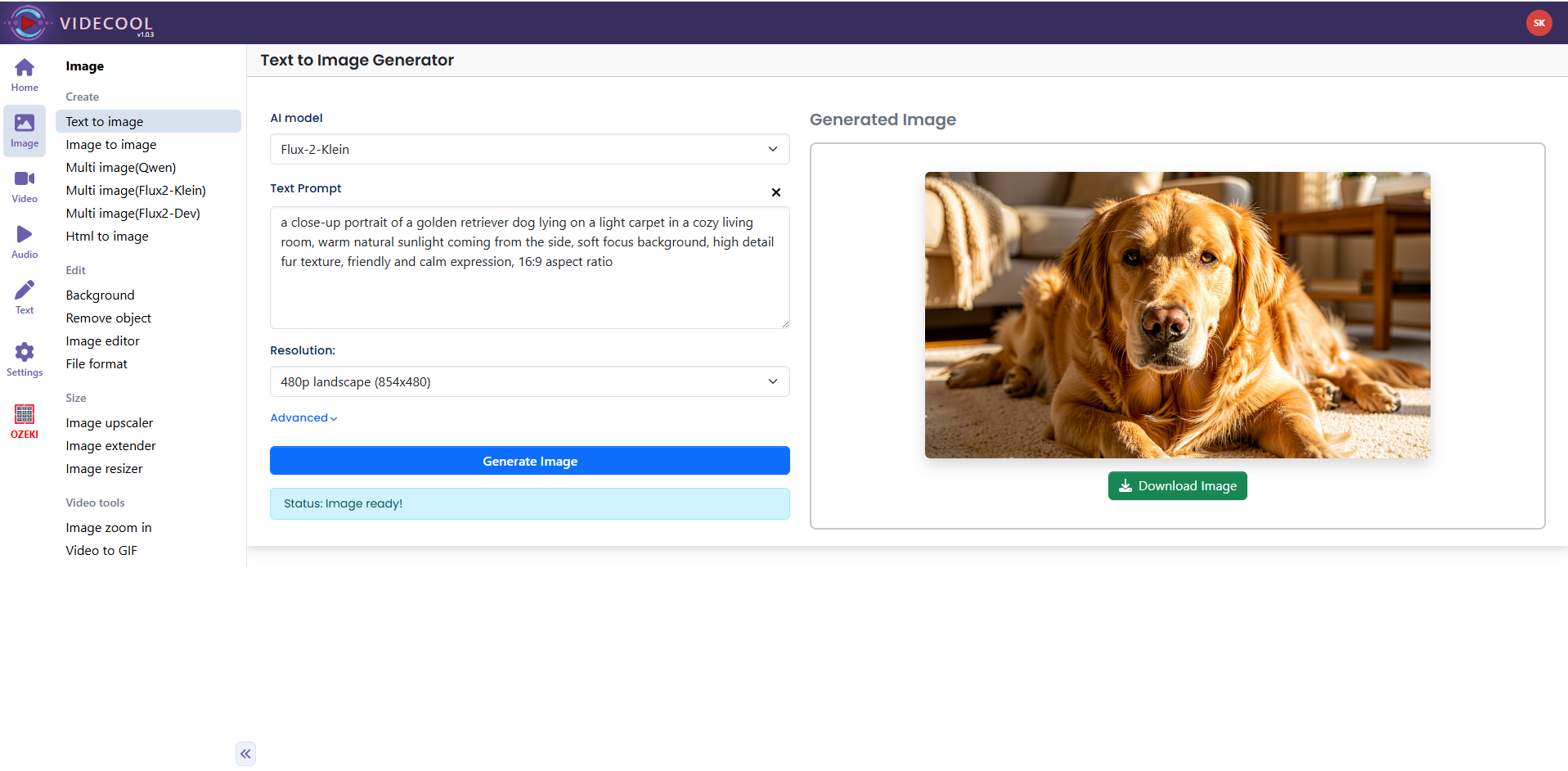
Example usage in Videcool
Download the ComfyUI workflow
Download ComfyUI Workflow file: flux_2_klein_text_to_image-api.json
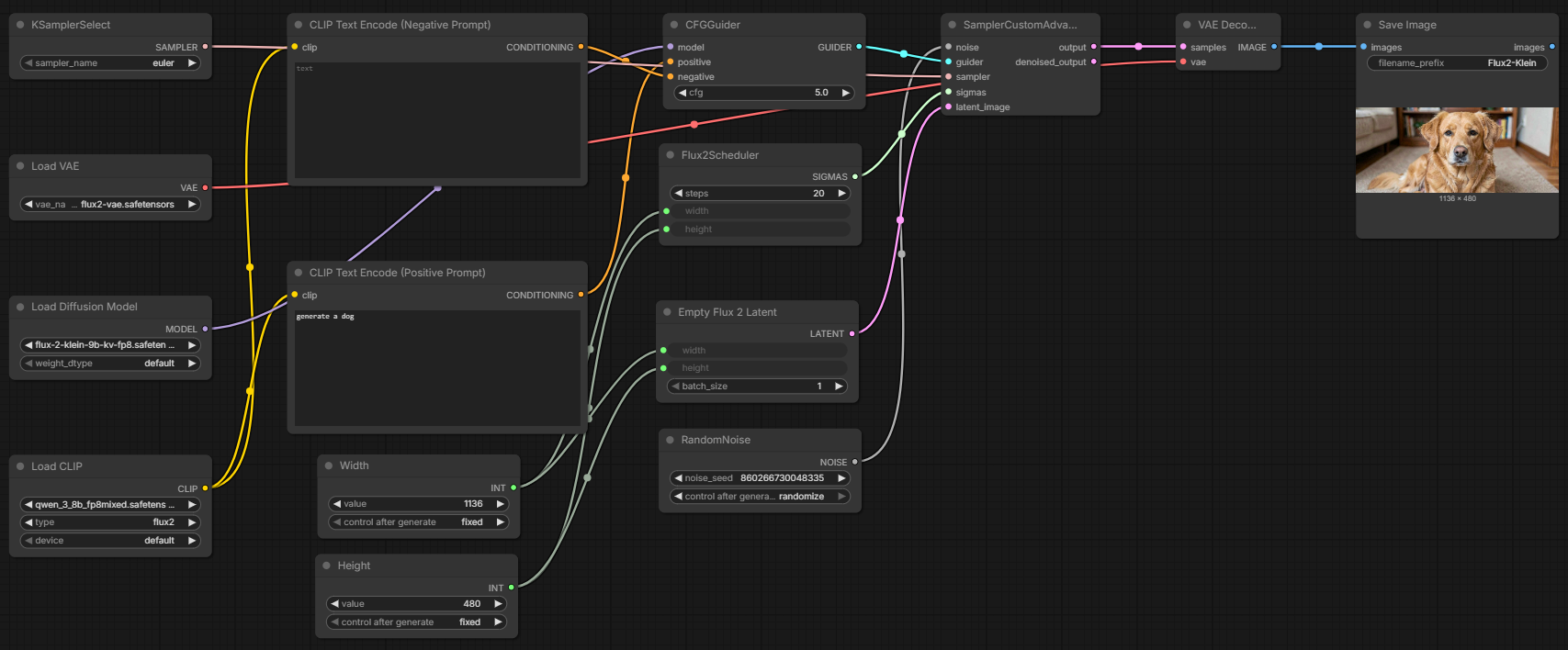
Image of the ComfyUI workflow
This workflow is organized as a straightforward text-to-image pipeline. The model loading nodes prepare the UNet, CLIP, and VAE; the prompt encoding nodes produce positive and negative conditioning; the scheduler, guider, noise generator, and sampler produce latent samples; and the VAE decode plus save nodes create the final output image.
Installation steps
Step 1: Download flux-2-klein-9b-kv-fp8.safetensors into /ComfyUI/models/diffusion_models/flux-2-klein-9b-kv-fp8.safetensors .Step 2: Download qwen_3_8b_fp8mixed.safetensors into /ComfyUI/models/text_encoders/qwen_3_8b_fp8mixed.safetensors .
Step 3: Download flux2-vae.safetensors into /ComfyUI/models/vae/flux2-vae.safetensors .
Step 4: Download the flux_2_klein_text_to_image-api.json workflow file into your home directory.
Step 5: Restart ComfyUI so the new model files are detected and loaded.
Step 6: Open the ComfyUI graphical user interface.
Step 7: Load the flux_2_klein_text_to_image-api.json file in the ComfyUI GUI.
Step 8: Enter your text into the CLIP Text Encode (Positive Prompt) node.
Step 9: Optionally adjust the width, height, seed, steps, sampler, or CFG value.
Step 10: Run the workflow to generate and save the image.
Prerequisites
To run the workflow correctly, place the following files into your ComfyUI models directory structure before loading the workflow:
ComfyUI/models/diffusion_models/flux-2-klein-9b-kv-fp8.safetensors
https://huggingface.co/black-forest-labs/FLUX.2-klein-9b-kv-fp8/resolve/main/flux-2-klein-9b-kv-fp8.safetensors
ComfyUI/models/text_encoders/qwen_3_8b_fp8mixed.safetensors
https://huggingface.co/Comfy-Org/vae-text-encorder-for-flux-klein-9b/resolve/main/split_files/text_encoders/qwen_3_8b_fp8mixed.safetensors
ComfyUI/models/vae/flux2-vae.safetensors
https://huggingface.co/Comfy-Org/vae-text-encorder-for-flux-klein-9b/resolve/main/split_files/vae/flux2-vae.safetensors
How to use this workflow in Videcool
Videcool can use this ComfyUI workflow to generate images from plain text without requiring you to build the pipeline manually. After importing the workflow, enter your prompt, keep or change the default 854x480 resolution, and execute the graph to produce a final image decoded from the sampled latent output.
ComfyUI nodes used
- Save Image
- KSamplerSelect
- Load VAE
- Load Diffusion Model
- Load CLIP
- Width
- Height
- RandomNoise
- CLIP Text Encode (Negative Prompt)
- CLIP Text Encode (Positive Prompt)
- Flux2Scheduler
- Empty Flux 2 Latent
- CFGGuider
- SamplerCustomAdvanced
- VAE Decode
Base AI model
This workflow is built on Flux 2 Klein, a modern and efficient diffusion-based text-to-image generator optimized for high-quality results and practical performance. Flux 2 Klein provides strong visual clarity and detail while keeping generation times reasonable, making it suitable for iterative creative workflows inside Videcool. The model stack in this workflow combines the Flux 2 Klein UNet diffusion model, a Qwen-based CLIP text encoder, and the Flux 2 VAE decoder, together covering prompt encoding, latent sampling, and image reconstruction. More details, model weights, and documentation for these components can be found on the linked Hugging Face model pages referenced in the installation and prerequisites sections above.
Hugging Face repository:
https://huggingface.co/black-forest-labs/FLUX.2-klein-9b-kv-fp8
Model information:
FLUX.2-klein is designed for rapid image generation with minimal quality loss.
Image resolution
The default resolution in this workflow is 854x480 pixels. These values are provided through dedicated width and height primitive nodes, so they can be edited easily when you want to generate images at a different size.
Conclusion
The Flux 2 Klein Text-to-Image workflow is a clean and efficient ComfyUI pipeline for Videcool users who want prompt-based image generation with a modern Flux 2 model stack. Its structure is easy to understand, easy to modify, and suitable as a starting point for both simple image generation and more advanced workflow customization.