
AI Text to Image Generation using Z-Image Turbo ComfyUI workflow for Videcool
The Z-Image Turbo Text-to-Image workflow in Videcool provides a powerful and flexible way to generate high-quality images directly from text prompts with exceptional speed. Designed for speed, clarity, and creative control, this workflow is served by ComfyUI and uses the Z-Image Turbo AI text-to-image model optimized for rapid generation.
What can this ComfyUI workflow do?
In short: Fast text-to-image generation with high quality.
This workflow converts written text prompts into fully generated images using optimized diffusion technology built for speed without sacrificing quality. It interprets your prompt, and outputs detailed, coherent visuals with high fidelity in minimal time. The base AI model it uses is optimized for rapid inference while maintaining visual quality across diverse subjects and styles.
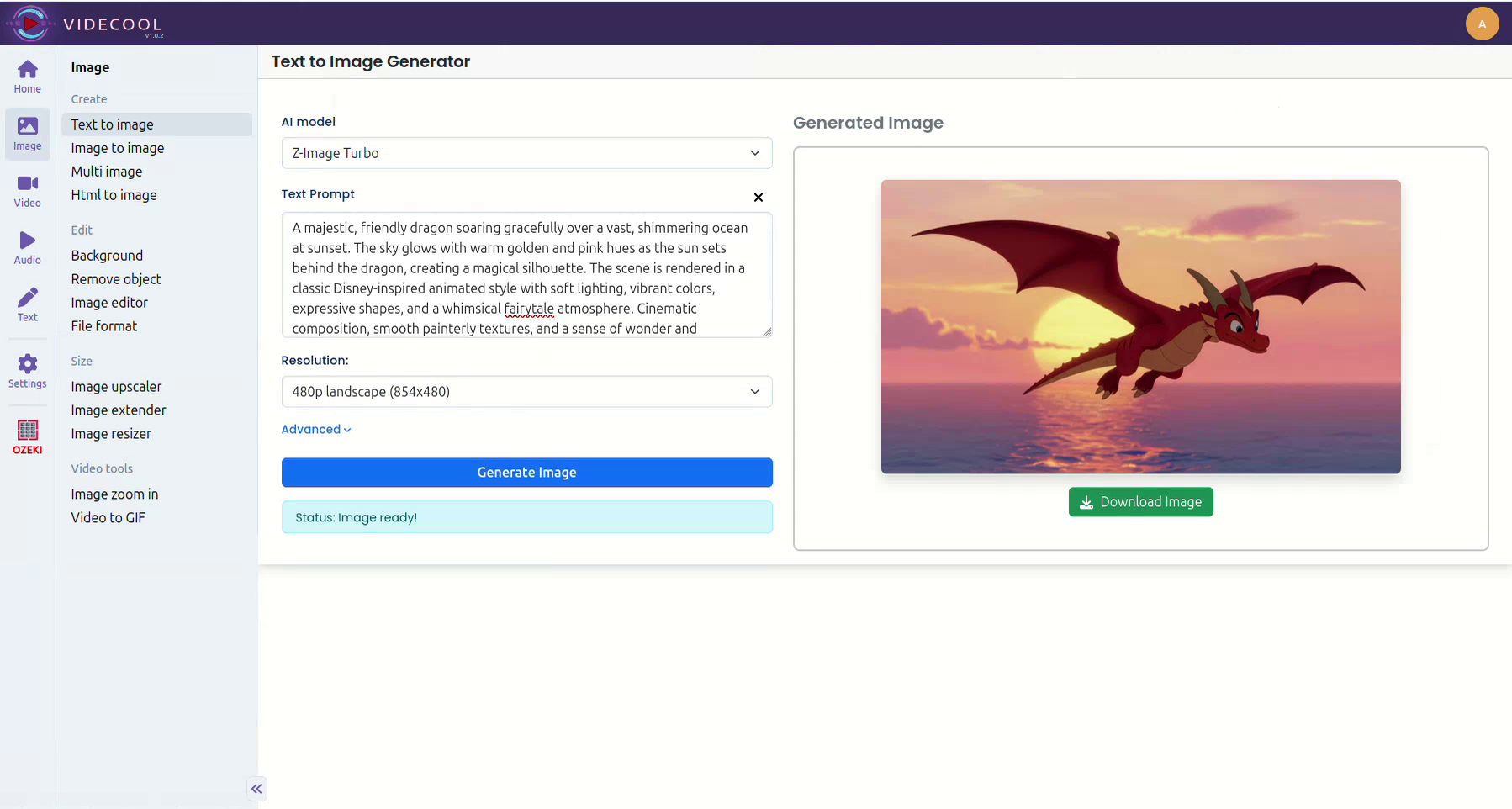
Example usage in Videcool
Download the ComfyUI workflow
Download ComfyUI Workflow file: image_z_turbo_text_to_image-api.json
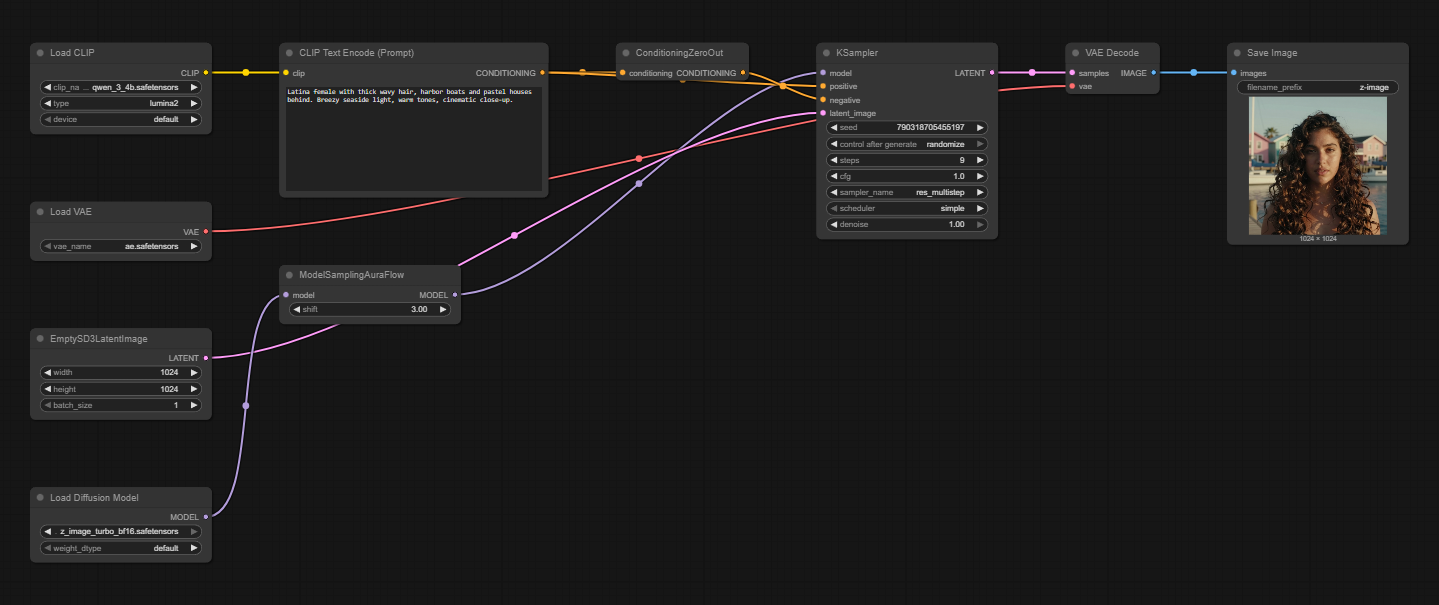
Image of the ComfyUI workflow
This figure provides a visual overview of the workflow layout inside ComfyUI. Each node is placed in logical order to establish a clean and efficient generation pipeline optimized for Z-Image Turbo. The structure makes it easy to understand how the text encoders, model loader, sampler, and VAE interact. Users can modify or expand parts of the workflow to create custom variations or batch operations.
Installation steps
Step 1: Download Z-Image-Turbo.safetensors into /ComfyUI/models/diffusion_models/Z-Image-Turbo.safetensors.Step 2: Download clip_l.safetensors into /ComfyUI/models/text_encoders/clip_l.safetensors.
Step 3: Download vae.safetensors into /ComfyUI/models/vae/z-image-turbo-vae.safetensors.
Step 4: Download the image_z_turbo_text_to_image-api.json workflow file into your home directory.
Step 5: Restart ComfyUI so the new model files are detected and loaded.
Step 6: Open the ComfyUI graphical user interface (ComfyUI GUI).
Step 7: Load the image_z_turbo_text_to_image-api.json in the ComfyUI GUI.
Step 8: Enter a text prompt into the "Clip Text Encode (Positive Prompt)" node and hit run to generate an image.
Step 9: Experience the fast generation speed while maintaining high visual quality.
Step 10: Open Videcool in your browser, select text-to-image generation, and choose Z-Image Turbo to generate images rapidly.
Installation video
The workflow requires only a text prompt and a few basic parameter adjustments to begin generating images rapidly. After loading the JSON file, users can select guidance scale, sampling steps, resolution, and prompt text. Once executed, the optimized sampler processes the latent representation and produces a final decoded image in significantly less time than standard models. The result can be saved and reused across other Videcool tools.
Prerequisites
To run the workflow correctly, download the following model files and place them into your ComfyUI directory. These files ensure the model can interpret language, convert prompts into latent embeddings, and decode the final images. Proper installation into the following location is essential before running the workflow: {your ComfyUI directory}/models.
ComfyUI\models\diffusion_models\Z-Image-Turbo.safetensors
https://huggingface.co/LayerNorm/Z-Image-Turbo/resolve/main/Z-Image-Turbo.safetensors
ComfyUI\models\text_encoders\clip_l.safetensors
https://huggingface.co/openai/clip-vit-large-patch14/resolve/main/model.safetensors
ComfyUI\models\vae\z-image-turbo-vae.safetensors
https://huggingface.co/LayerNorm/Z-Image-Turbo/resolve/main/vae.safetensors
How to use this workflow in Videcool
Videcool integrates seamlessly with ComfyUI, allowing users to load workflows directly and generate images without external complexity. After importing the workflow file, simply enter your prompt and click generate. The system handles all backend interactions with ComfyUI while Z-Image Turbo delivers fast results. This makes rapid image creation intuitive and accessible, even for users who are not keen on learning how ComfyUI works, while enabling quick iterations for content creators. The following video shows how this model can be used in Videcool.
ComfyUI nodes used
This workflow uses the following nodes. Each node performs a specific role, such as loading models, encoding text, sampling, and finally decoding the output. Together they create a reliable and modular pipeline optimized for Z-Image Turbo that can be easily extended or customized.
- EmptySD3LatentImage
- Load Diffusion Model
- Load VAE
- Clip Text Encode
- KSampler
- VAE Decode
- Save Image
- Load CLIP
- ConditioningZeroOut
Base AI model
This workflow is built on Z-Image Turbo model, a modern and efficient diffusion-based text-to-image generator optimized for speed. Z-Image Turbo provides fast generation times while maintaining clarity and visual quality, making it suitable for rapid iteration workflows and time-sensitive creative projects. The model benefits from optimized architecture and inference patterns, offering fast results across a variety of styles and prompts. More details, model weights, and documentation can be found on the following links:
Hugging Face repository:https://huggingface.co/LayerNorm/Z-Image-Turbo
Model information:Z-Image Turbo is designed for rapid image generation with minimal quality loss.
Image resolution
AI text-to-image models perform best when they generate images in their native resolution, which was used for training. For the Z-Image Turbo model, information about optimal resolution can be found below:
Native image size: 512x512px or 768x768px (model-dependent)The model supports other resolutions. Best resolutions are multiples of 32px.
Z-Image Turbo is optimized for fast inference, so even larger resolutions can be generated quickly.
Conclusion
The Z-Image Turbo Text-to-Image workflow is a robust, powerful, and user-friendly solution for generating AI-driven visuals rapidly in Videcool. With its combination of speed-optimized models, a modular ComfyUI pipeline, and seamless platform integration, it enables beginners and professionals alike to produce creative images with exceptional speed while maintaining visual quality. By understanding the workflow components and advantages, users can unlock the full potential of fast AI-assisted image generation with Z-Image Turbo in Videcool.