
Load Diffusion Model
The Load Diffusion Model node is a foundational component in ComfyUI, empowering users to integrate state-of-the-art Stable Diffusion and compatible neural network models directly into their workflows. By easily selecting a model file and device, this node serves as the gateway for advanced image generation, customization, and experimentation, making sophisticated AI-powered creativity accessible within a visual pipeline. Whether you're building art, testing new styles, or optimizing for performance, the Load Diffusion Model node streamlines your journey to high-quality results.
Overview
The Load Diffusion Model node is a core utility in ComfyUI that allows users to load Stable Diffusion or compatible diffusion models into the workflow.
By initializing the neural network parameters from a selected model file (typically .ckpt or .safetensors), this node makes the model available for subsequent inference or image generation steps.
It acts as the entry point for model selection, ensuring downstream nodes can process, interpret prompts, or generate images based on the loaded neural network weights.
Visual Example
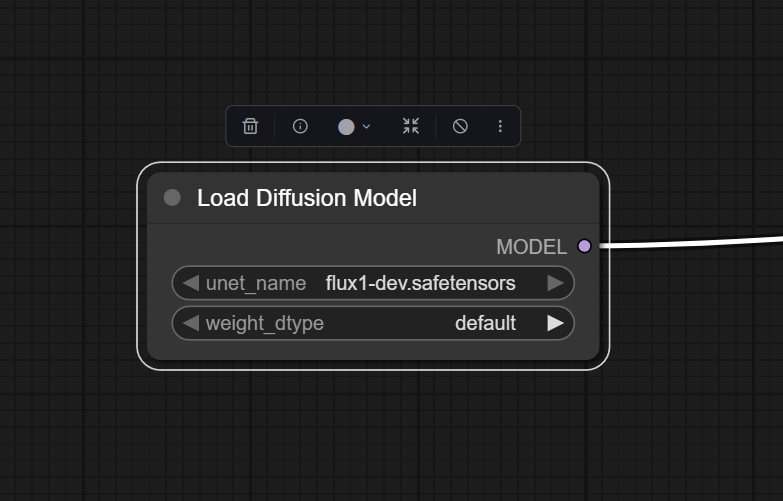
Below is a screenshot of the node in the ComfyUI interface:
Official Documentation Link
https://comfyui-wiki.com/en/comfyui-nodes/advanced/loaders/unet-loader
Inputs
| Parameter | Comfy dtype | Description | Required |
|---|---|---|---|
| unet_name | COMBO[STRING] | Specifies the name of the U-Net model to be loaded. This name is used to locate the model within a predefined directory structure, enabling the dynamic loading of different U-Net models. | Yes |
| weight_dtype | … | fp8_e4m3fn fp9_e5m2 | Yes |
Outputs
| Parameter | Comfy dtype | Description |
|---|---|---|
| model | MODEL | Returns the loaded U-Net model, allowing it to be utilized for further processing or inference within the system. |
Usage Instructions
Drag "Load Diffusion Model" from the node browser into your workflow. In the node's properties, select or input the path to your desired diffusion model checkpoint. (Optional) Set the computation device if required (e.g., "cuda" for GPU). If applicable, link a trigger or event (startup, button, etc.) to the node's input. Link the model output to downstream nodes such as samplers, custom pipelines, or inference operations. Execute your workflow. The node will load the model and propagate it to connected nodes.
Advanced Usage
Wire multiple Load Diffusion Model nodes and use selector/control nodes to dynamically switch models during runtime for dynamic model switching. Some ComfyUI extensions allow custom model merging or LoRA injection downstream—ensure loaded models are compatible for version compatibility. You can link this node's output to special nodes that alter, merge, or modify the loaded model before inference for chaining with model modifiers.
Example JSON for API or Workflow Export
{
    "inputs": {
      "unet_name": "flux1-dev.safetensors",
      "weight_dtype": "default"
    },
    "class_type": "UNETLoader",
    "_meta": {
      "title": "Load Diffusion Model"
    }
  }
Tips
- Prompt Writing: The quality of generations depends on the prompt used downstream; match your model’s capabilities to prompt length/detail.
- Device Choice: For best performance, use "cuda" if you have a supported NVIDIA GPU.
- Model Format: Always verify the model is in
.ckptor.safetensorsformat—a bad file will cause loading errors. - Cache Usage: Loaded models may persist in VRAM; monitor memory if chaining multiple large models.
How It Works (Technical)
The node loads model weights from the provided file and initializes them on the selected device. It returns an object reference in memory, which is then passed to subsequent nodes (such as samplers, prompt encoders, or image generation nodes) to perform diffusion-based inference. The node uses the PyTorch backend for loading, and, depending on the workflow, can re-use loaded models to optimize performance.
Github alternatives
ComfyUI-GGUF:
https://github.com/city96/ComfyUI-GGUF
ComfyUI_UNet_bitsandbytes_NF4:
https://github.com/DenkingOfficial/ComfyUI_UNet_bitsandbytes_NF4
ComfyUI-MultiGPU:
https://github.com/pollockjj/ComfyUI-MultiGPU
Videcool workflows
The Load Diffusion Model node is used in the following Videcool workflows:
FAQ
1. What model file formats are supported?
The node supports .ckpt (Checkpoint) and .safetensors files containing diffusion model weights.
2. How do I speed up loading?
Use models stored on SSDs and select the "cuda" device for GPU acceleration.
3. The model doesn't load; what should I do?
Double-check the file path, file integrity, and ensure compatibility with the ComfyUI version.
Common Mistakes and Troubleshooting
Incorrect file path is a common issue—ensure the model path is absolute or relative to the environment's model directory. Out of memory errors can occur with large models that require significant VRAM—use smaller variants or lower batch sizes if errors occur. Specifying an unavailable device (e.g. "cuda" on a CPU-only system) causes failure. Only connect the model output to nodes that accept diffusion models; using the wrong node type in chain can cause problems.
Conclusion
The Load Diffusion Model node is an essential building block for ComfyUI workflows, enabling customized AI image generation by loading state-of-the-art diffusion models. Proper configuration and understanding allow for advanced and flexible image synthesis pipelines.