
VibeVoice Multiple Speakers
The VibeVoice Multiple Speakers node enables expressive, high-fidelity, multi-speaker voice synthesis using the Microsoft VibeVoice model in ComfyUI. It’s designed to generate dialogue, audiobooks, conversational AI content, or voice acting sessions, supporting both reference-based voice cloning and zero-shot synthetic speaker creation.
Overview
VibeVoice Multiple Speakers takes structured dialogue scripts—annotated with speaker indicators and
(optionally) audio samples for voice cloning—and generates long-form conversational speech tracks. Up to four distinct
voices are supported per audio clip, with each speaker optionally sourced from reference audio or dynamically synthesized by the node.
It is typically used in TTS, character voice generation, and dynamic audio storytelling workflows. Integrate with LoadAudio
(for reference voice), de>Text Input (for dialogue), and audio save nodes for a full pipeline.
Visual Example
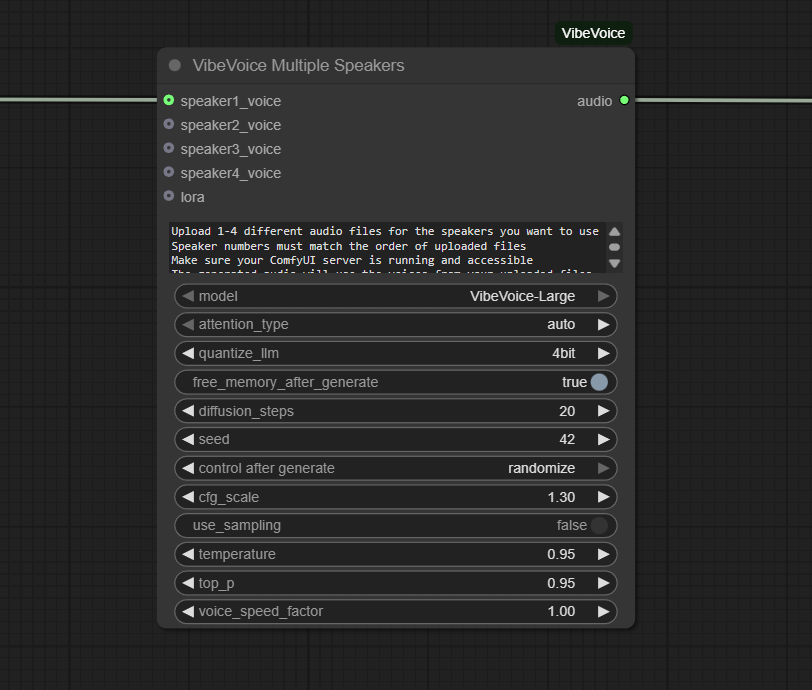
Official Documentation Link
https://github.com/wildminder/ComfyUI-VibeVoice
Inputs
| Parameter | Data Type | Input Method | Default |
|---|---|---|---|
| dialogue_script | String (multiline) | Text box (with [N]: speaker markup or text file node) | "" |
| speaker_1_voice | Audio/Tensor | LoadAudio node connection (optional) | (generated) |
| speaker_2_voice | Audio/Tensor | LoadAudio node connection (optional) | (generated) |
| speaker_3_voice | Audio/Tensor | LoadAudio node connection (optional) | (generated) |
| speaker_4_voice | Audio/Tensor | LoadAudio node connection (optional) | (generated) |
| model | Enum | Select (e.g., VibeVoice-Large, -Medium) | VibeVoice-Large |
| language | String | Dropdown or auto (defaults to script language) | auto |
Outputs
| Output Name | Data Type | Description |
|---|---|---|
| audio | Waveform/Tensor | Synthesized multi-speaker audio with mixed cloned and synthetic voices |
Usage Instructions
Insert VibeVoice Multiple Speakers into your workflow. Write or connect a “dialogue_script” using the [N]: convention (e.g., [1]: Hello, [2]: Hi!) or load it from a text file node. For speaker cloning, connect reference audio files to speaker voice slots; leave empty for synthetic generation. Select your model and set language if required. Run the workflow. The node will analyze the script, assign lines to voices, blend cloned and zero-shot speakers, and output a final long-form conversation or dialogue audio. Chain to playback, SaveAudio, or further post-processing as needed.
Advanced Usage
For extended cast or round-table podcasts, duplicate and sequence multiple VibeVoice Multiple Speakers nodes. For animated/multilingual content, switch language parameter or script content per block. Use downstream denoising, upscaling, or alignment tools to fine-tune dialogue delivery. Integrate with timeline or audio segmentation nodes for dialogue that syncs with animations or visual scenes. Use the LoRA configuration output for advanced speaker embedding or to flexibly swap combinations during workflow execution. Batch process multiple script files for voice-over, audiobook, or synthetic training-data generation.
Example JSON for API or Workflow Export
{
  "id": "vibevoice_multispeaker_1",
  "type": "VibeVoiceMultipleSpeakers",
  "inputs": {
    "dialogue_script": "[1]: Hello! [2]: Hi there, friend.",
    "speaker_1_voice": "@loadaudio_1",
    "speaker_2_voice": null,
    "speaker_3_voice": null,
    "speaker_4_voice": null,
    "model": "VibeVoice-Large",
    "language": "auto"
  }
}
Tips
- Use descriptive, clean reference audio for best voice cloning results.
- The [N]: markup quickly assigns lines to up to four speakers in a single script.
- If you leave some speaker_voice slots empty, the node generates a zero-shot synthetic voice for that role.
- For multilingual content, set language or mix-language scripts—supported on VibeVoice-Large and newer.
- Test shorter scripts first; batch or segment long dialogue for better error recovery and control.
How It Works (Technical)
This node parses the input script, matching [N]: lines to speaker slots. If reference voice is provided for speaker N, it clones the timbre using VibeVoice’s embedding and identity extraction; otherwise, it generates a synthetic (zero-shot) voice. The system auto-detects speakers and performs text-to-speech using the selected VibeVoice model, merging results into a single waveform. Output is provided as an audio tensor for downstream playback, saving, or analysis.
Github Alternatives
- ComfyUI-VibeVoice – Official multi-speaker VibeVoice node for ComfyUI; supports up to 4 clones, hybrid/zero-shot voices, LoRA connectors, and multi-language.
- VibeVoice-ComfyUI – Comprehensive multi-speaker voice synthesis, text file integration, and speaker management.
- TTS-Audio-Suite – Multi-engine TTS, high-quality voice cloning, multi-speaker, multi-language, and voice character switching for ComfyUI.
Videcool workflows
The VibeVoice Multiple Speakers node is used in the following Videcool workflows:
FAQ
1. How are speakers assigned in a script?
Use [1]:,[2]:,[3]:,[4]: markup per line; connect reference audio for voice cloning or leave empty for generated voices.
2. Can I combine cloned and synthetic voices in one workflow?
Yes—mixed assignment is supported, so some speakers can be clones, others zero-shot synthetic (generated).
3. What models and languages are supported?
Typically, VibeVoice-Large (recommended). Multi-language support is available; results may vary by model and script language content.
Common Mistakes and Troubleshooting
Common issues include misformatted scripts (forgetting the [N]: markup), connecting low-quality or mismatched reference audio (garbled or off-target voice clones), and exceeding the speaker limit (max 4). For best results, always provide clear reference samples and test with simple scripts before scaling up. If your workflow is slow or stalls, consider segmenting longer dialogues. Speaker confusion may occur if markup is ambiguous; always ensure correct and unique assignment per line.
Conclusion
VibeVoice Multiple Speakers empowers users to synthesize highly realistic, engaging, and flexible multi-speaker audio for storytelling, conversation, and creative applications—all within the node-based system of ComfyUI.