
ModelSamplingSD3
The ModelSamplingSD3 node adjusts the sampling behavior of SD3-based models in ComfyUI by applying a configurable shift
to the model’s sampling strategy. It is used to fine‑tune the balance between exploration and exploitation during generation, improving output
quality or diversity depending on task requirements.
Overview
ModelSamplingSD3 takes an existing SD3 model object and returns a modified model whose internal sampler dynamics have
been altered according to the shift parameter. A higher shift value typically encourages more exploratory sampling, while
lower values favor more conservative, exploitation‑focused behavior, making it valuable in workflows where sampling dynamics meaningfully
affect the final result (for example, text‑to‑image, predictive modeling, or RL‑style decision flows built on SD3 backbones).
Visual Example
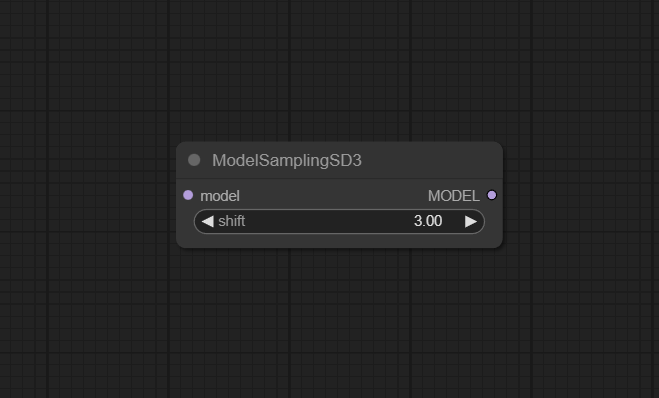
Official Documentation Link
https://comfyai.run/documentation/ModelSamplingSD3
Inputs
| Parameter | Data Type | Input Method | Default |
|---|---|---|---|
| model | MODEL | Connection from an SD3 model loader or checkpoint loader | — |
| shift | FLOAT | Numeric field / slider (range 0–100, step 0.01) | 3.0 |
Outputs
| Output Name | Data Type | Description |
|---|---|---|
| MODEL | MODEL | Updated SD3 model with modified sampling configuration based on shift |
Usage Instructions
Load your SD3 model using a standard checkpoint loader or model loader node, and connect its model output
to the ModelSamplingSD3 input. Set the shift parameter between 0 and 100 (the default 3.0 is a
reasonable starting point) to control how aggressively the sampling behavior is altered. Feed the resulting MODEL
output into your sampler node (e.g., KSampler) so all subsequent sampling uses the adjusted SD3 configuration.
Advanced Usage
In advanced workflows, you can dynamically sweep shift across a range of values for A/B testing or grid search,
helping identify a sweet spot between diversity and stability for a given prompt distribution. Combine multiple sampling modifier nodes
(e.g., ModelSamplingSD3 with CFG‑related controllers) to explore complex sampling regimes, and log performance metrics as you vary
shift to tune production systems. In reinforcement‑style or iterative pipelines, you can adapt shift
online in response to performance feedback, allowing SD3 sampling to become more exploitative over time.
Example JSON for API or Workflow Export
{
  "id": "modelsampling_sd3_1",
  "type": "ModelSamplingSD3",
  "inputs": {
    "model": "@load_sd3_model_1",
    "shift": 3.0
  }
}
Tips
- Begin with the default
shift = 3.0, then adjust in small increments to see how outputs change rather than jumping to extremes. - If model outputs become too random or unstable, reduce
shifttoward the lower end of the allowed range. - For applications that need high exploration (e.g., idea generation or search), test slightly higher
shiftvalues while monitoring quality. - Always ensure the referenced model identifier exists and is loaded; “Model Not Found” indicates a misconfigured or missing model connection.
- Record both
shiftand seed in experiments so promising settings are reproducible.
How It Works (Technical)
Internally, ModelSamplingSD3 takes a model object and applies a transformation that reconfigures SD3’s sampling strategy
using the scalar shift parameter. The node alters how the model’s sampling distribution is traversed—for example by scaling
internal temperature‑like terms, adjusting score weighting, or biasing step transitions—so that higher shift values increase
exploratory behavior and lower values favor more conservative sampling. The modified model object is then passed forward so downstream
sampler nodes operate under the new configuration.
Github alternatives
- There are currently no well‑known standalone GitHub node packs that replicate ModelSamplingSD3’s SD3‑specific sampling shift behavior exactly; most alternatives focus on general sampling (sampler/scheduler nodes) rather than SD3‑targeted model‑level sampling modifiers.
- Users interested in related functionality can explore advanced sampler packs (e.g., custom samplers, CFG++ controllers, and experimental schedulers) to complement ModelSamplingSD3 for broader sampling control.
- General ComfyUI custom‑node collections often include experimental sampling or guidance nodes that can be combined with ModelSamplingSD3, but they do not replace its SD3‑specific model sampling adjustment.
Videcool workflows
The ModelSamplingSD3 node is used in the following Videcool workflows:
FAQ
1. What does the shift parameter actually control?
It controls how strongly the node modifies SD3’s sampling behavior: higher values bias the model toward more exploratory sampling, while
lower values keep it closer to default, exploitative behavior.
2. What range of values can shift take?
The allowed range is 0 to 100 with a typical default of 3.0; values outside this interval will trigger validation errors and should be corrected.
3. Why do I get a “Model Not Found” error?
This occurs when the referenced model is not loaded or the identifier is incorrect—verify that your upstream loader node
is configured properly and that the connection into ModelSamplingSD3 is valid.
Common Mistakes and Troubleshooting
The most common issues involve providing an invalid or unloaded model (leading to “Model Not Found”) or setting shift outside its valid [0, 100] range,
which triggers an “Shift Value Out of Range” error; both are resolved by correcting the model connection and staying within the documented bounds.
Over‑aggressive shift values can degrade performance, causing noisy or low‑quality outputs; in these cases, gradually reduce shift
while evaluating results until output quality stabilizes. If performance remains poor, reset to the default 3.0 and retune in small steps.
Conclusion
ModelSamplingSD3 provides fine‑grained control over SD3 sampling dynamics in ComfyUI, enabling practitioners to tune exploration vs. exploitation to match their application’s needs. By adjusting a single, well‑scoped parameter, it offers a practical way to refine model behavior in complex decision‑making and generative workflows without changing model weights or sampler code.