
ModelSamplingAuraFlow
The ModelSamplingAuraFlow node enhances the sampling process of AI models in ComfyUI, specifically tailored for the AuraFlow architecture. It allows creators to apply advanced sampling techniques by adjusting model parameters for optimal image quality and style control.
Overview
ModelSamplingAuraFlow is designed to patch or adjust AuraFlow-compatible models during the sampling process.
By configuring the shift parameter, users can fine-tune how the model interpolation or time-step management affects generation,
allowing for smoother transitions, better convergence, or unique creative results. The node is typically inserted between the main model
loader and the sampler (such as KSampler) in advanced workflows, directly modifying the model as it is sampled.
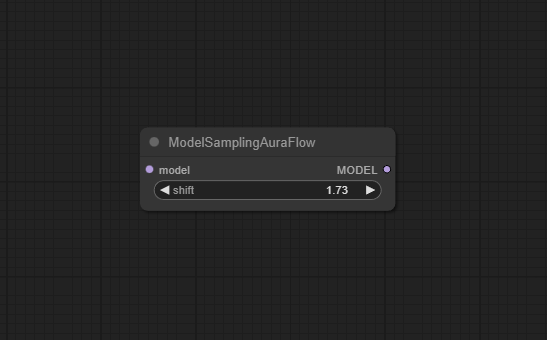
Visual Example
Official Documentation Link
https://comfyai.run/documentation/ModelSamplingAuraFlow
Inputs
| Fields | Data Type | Input Method | Default |
|---|---|---|---|
| model | Object | Model loader node output | — |
| shift | Float | Numeric field/slider | 1.73 |
Outputs
| Output Name | Data Type | Description |
|---|---|---|
| model | Object | Model with AuraFlow patch applied, ready for downstream sampler nodes |
Usage Instructions
Add ModelSamplingAuraFlow after your primary model loader in the workflow. Connect the model output from "Load Diffusion Model" or a compatible loader to the "model" input. Set the shift parameter (suggested start value: 1.73; valid range 0.0 – 100.0) to control sampling dynamics. Attach the output to a sampler node (e.g., KSampler) for further image generation steps. Run your workflow—the node patches the model for smooth and efficient AuraFlow sampling.
Advanced Usage
Experiment with de>shift values for unique stylistic or stability effects; even minor changes can noticeably alter output. Combine with FLUX or ControlNet nodes for compositional or guided generation effects. Chain with "Model Merge" or "Model Patch Loader" nodes in large workflows for batch experimentation or ablation studies. Integrate with tiled or distributed sampling extensions for massive images while still benefitting from AuraFlow tuning.
Example JSON for API or Workflow Export
{
  "id": "aura_flow_1",
  "type": "ModelSamplingAuraFlow",
  "inputs": {
    "model": "@load_diffusion_model_1",
    "shift": 1.73
  }
}
Tips
- If unsure, use the default
shiftvalue (1.73) and adjust incrementally for your dataset or subject. - Monitor image quality and diversity as you adjust; overlarge
shiftcan introduce instability or over-stylization. - If the node throws an error, check that the input model is AuraFlow-compatible.
- Review generated images and inspect batch runs to determine optimal settings for your workflow and goal.
How It Works (Technical)
The node calls a patch or injection method (e.g., patch_aura) on the input model, modifying its sampling parameters such as time-step interpolation, normalization schedule, or internal step scaling. The de>shift value tweaks how time or features interpolate during sampling, which is reflected in image smoothness, detail, or style. The patched model outputs to the next sampler node for standard diffusion or image generation.
Github Alternatives
- ComfyUI-piFlow – Provides custom nodes implementing pi-Flow few-step sampling, offering an alternative approach for fast, high-quality generative results.
- ComfyUI-AnimateDiff-Evolved – Advanced AnimateDiff integration and “Evolved Sampling” nodes, usable outside animation for enhanced generator control.
- top-100-comfyui – Curated collection of advanced model nodes for ComfyUI, including ModelSampling* alternatives for SD3, Flux, ContinuousEDM, and more.
Videcool workflows
The Clip Text Encode (Positive Prompt) node is used in the following Videcool workflows:
Videcool workflows
The ModelSamplingAuraFlow node is used in the following Videcool workflows:
- AI Text to Image
- AI Text to Image Wan 2.2
- AI Text to Image Qwen
- AI Audio Generator Ace Steps
- AI Image Object Remove
- AI voice clone
Videcool workflows
The ModelSamplingAuraFlow node is used in the following Videcool workflows:
FAQ
1. What does the `shift` parameter control?
It adjusts the model's sampling schedule/interpolation for AuraFlow, influencing quality and style.
2. What models are compatible with ModelSamplingAuraFlow?
AuraFlow and other supporting models that implement the required patch/injection function.
3. What happens if I set shift outside 0.0–100.0?
The node will throw an error or clamp the value. Stay within the allowed range.
Common Mistakes and Troubleshooting
Feeding a non-AuraFlow-compatible model results in node errors—always check compatibility.
Extreme shift values may cause overfitting, artifacts, or workflow failures. For forgotten or misconnected outputs,
always re-check workflow links after major edits. Ensure nodes upstream and downstream are compatible with patched model parameters.
Conclusion
The ModelSamplingAuraFlow node is an invaluable tool for advanced generative art and research with AuraFlow. It bridges creative control and technical refinement, letting artists and engineers tailor their models for superior quality, diversity, and style—turning every output into a masterpiece.