
CLIP Vision Encode
The CLIP Vision Encode node encodes images with a CLIP vision model, converting them into high‑dimensional feature embeddings that can guide unCLIP diffusion models, serve as visual conditions, or power similarity and analysis tasks in ComfyUI workflows.
Overview
CLIP Vision Encode takes a loaded CLIP vision model and an input image, and produces a CLIP_VISION_OUTPUT
embedding that represents the image’s visual content in CLIP’s multimodal space. These embeddings are commonly used with unCLIP
conditioning nodes, style or reference‑guidance nodes, and custom logic for image‑image similarity or retrieval.
The node sits between image loaders/processors and conditioning‑aware nodes, bridging pixel space and CLIP’s latent representation.
Visual Example
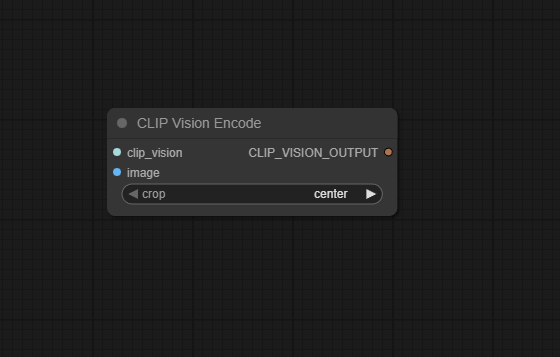
Official Documentation Link
https://comfyui-wiki.com/en/comfyui-nodes/conditioning/clip-vision-encode
Inputs
| Parameter | Data Type | Input Method | Default |
|---|---|---|---|
| clip_vision | CLIP_VISION | Connection from a CLIP Vision loader node (for example, Load CLIP Vision) | — (required) |
| image | IMAGE | Connection from Load Image or any image‑producing node | — (required) |
Outputs
| Output Name | Data Type | Description |
|---|---|---|
| clip_vision_output | CLIP_VISION_OUTPUT | Image embedding produced by the CLIP vision model, suitable for unCLIP conditioning, style models, similarity, or further processing |
Usage Instructions
Load a CLIP vision model with a node such as Load CLIP Vision, then connect its output to the
clip_vision input of CLIP Vision Encode. Feed an image
(for example from Load Image, preprocessed or resized as needed) into the image input.
The node outputs clip_vision_output, which you can connect to nodes that accept
CLIP_VISION_OUTPUT, such as unCLIP conditioning nodes, style/reference modules, or custom CLIP‑based logic.
Ensure the vision model and any downstream unCLIP diffusion model are compatible (for example, matching CLIP variant).
Advanced Usage
Advanced workflows may combine multiple CLIP Vision Encode nodes to encode several reference images, then merge or weight their embeddings to create composite visual conditions. For unCLIP workflows, the output can be mixed with text conditioning to control how strongly the image reference influences generation. In retrieval or similarity setups, the embeddings can be compared via cosine similarity to rank images or to select the closest match as a style or layout guide. When working with video or multi‑frame inputs, you can encode keyframes individually and aggregate their embeddings (for example, average or attention‑weighted) to build a robust visual descriptor of the whole sequence.
Example JSON for API or Workflow Export
{
   "id":"clip_vision_encode_1",
   "type":"CLIPVisionEncode",
   "inputs":{
      "clip_vision":"@load_clip_vision_1",
      "image":"@load_image_1"
   }
}
Tips
- Use the CLIP vision model that matches your unCLIP or style model family (for example, the correct ViT variant) to avoid degraded guidance.
- Preprocess images (crop, center, or resize) in a consistent way before encoding so embeddings are comparable across references.
- Store or cache CLIP embeddings for static reference images to speed up repeated runs without re‑encoding every time.
- If you use CLIP Vision Encode only for similarity search, you can decouple it from any diffusion pipeline and run it in a minimal workflow.
- For subtle guidance, blend CLIP vision output with text conditioning and tune strength in downstream conditioning nodes instead of over‑relying on one source.
How It Works (Technical)
CLIP Vision Encode passes the input IMAGE through the provided CLIP_VISION
model’s image encoder, which typically includes a vision transformer (ViT) or similar backbone.
The image is normalized and resized according to the CLIP model’s requirements, then embedded into a high‑dimensional
feature space. The resulting tensor, wrapped as CLIP_VISION_OUTPUT, captures global and
semantic information about the image content and can be consumed by unCLIP diffusion models or any node that
expects CLIP‑style visual embeddings. The node itself performs no further post‑processing beyond returning this encoded representation.
Github alternatives
- WanVideoWrapper – WanVideoClipVisionEncode – provides a specialized CLIP vision encoder for WanVideo, including multi‑GPU support, tiled encoding, and dual‑image blending built on the same core concept of CLIP vision image embeddings.
- comfy‑cliption – uses a CLIP vision encoder inside ComfyUI to convert images to text captions, demonstrating an alternative downstream use of CLIP vision features.
- Awesome ComfyUI custom nodes – curated list that includes various CLIP‑related nodes (loaders, encoders, clamps, and normalization utilities) that can complement or extend CLIP Vision Encode in specialized workflows.
FAQ
clip_vision_output?You can feed it into unCLIP conditioning nodes to guide diffusion with a reference image, use it for style or layout guidance, or compute similarities between images by comparing their embeddings.
Yes, you should load a CLIP vision model that matches your intended downstream model (for example, the same CLIP variant used by your unCLIP or style checkpoint) to get meaningful, compatible embeddings.
The node requires a valid
CLIP_VISION instance; if clip_vision is None
or not wired, the internal encode call fails, so always ensure a CLIP vision loader is connected.
Common Mistakes and Troubleshooting
A common issue is leaving clip_vision unconnected or loading an incompatible CLIP vision model,
which leads to runtime errors or weak guidance; always verify the loader node and that it matches your diffusion pipeline.
Another pitfall is feeding extremely low‑resolution or heavily distorted images, which can produce poor
embeddings and unstable unCLIP behavior—preprocess images to reasonable sizes and consistent framing.
If downstream nodes complain about type mismatches, confirm you are passing CLIP_VISION_OUTPUT
where required, not an IMAGE or generic CONDITIONING.
For debugging, test the node with known example workflows (such as the unCLIP examples in the community manual)
to ensure your CLIP vision stack is configured correctly.
Conclusion
CLIP Vision Encode is a core conditioning node in ComfyUI, bridging raw images and CLIP’s powerful vision embeddings so that diffusion models, style tools, and analysis workflows can leverage visual semantics alongside text, enabling richer and more controllable AI‑generated content.