
VAEDecodeHunyuan3D
The VAEDecodeHunyuan3D node decodes Hunyuan3D latent representations into 3D voxel grids using a dedicated VAE, turning compact latent tensors into detailed, manipulable 3D volumes suitable for visualization, meshing, and downstream 3D processing.
Overview
VAEDecodeHunyuan3D is used near the end of a Hunyuan3D workflow to convert geometry latents—typically produced by a Hunyuan3D sampler
operating on EmptyLatentHunyuan3Dv2—into voxel data. The node takes samples (latents), a compatible Hunyuan 3D
VAE, and decoding controls like num_chunks and octree_resolution, then outputs a structured
VOXEL grid. In complete pipelines it is often followed by nodes such as VoxelToMesh and SaveGLB to
produce final mesh files.
Visual Example
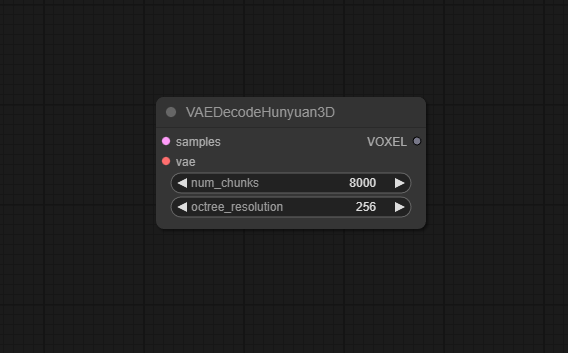
Official Documentation Link
https://www.runcomfy.com/comfyui-nodes/ComfyUI/vae-decode-hunyuan3-d
Inputs
| Parameter | Data Type | Input Method | Default |
|---|---|---|---|
| samples | LATENT | Connection from a Hunyuan3D sampler or geometry node (latent dictionary or tensor) | — (required) |
| vae | VAE | Connection from a Hy3D/Hunyuan3D VAE loader node | — (required) |
| num_chunks | INT | Numeric field / slider (min 1000, max 500000) | 8000 |
| octree_resolution | INT | Numeric field / slider (min 16, max 512) | 256 |
Outputs
| Output Name | Data Type | Description |
|---|---|---|
| VOXEL | VOXEL | 3D voxel grid decoded from Hunyuan3D latents, ready for visualization, voxel‑space editing, or mesh conversion |
Usage Instructions
In a standard Hunyuan3D‑2 pipeline, generate latents using EmptyLatentHunyuan3Dv2 plus a Hunyuan3D sampler (for example through HunyuanWorld nodes), then connect the resulting samples to VAEDecodeHunyuan3D. Load a matching Hunyuan 3D VAE via a Hy3DVAELoader‑style node and wire its output into vae. Set num_chunks according to your memory budget (default 8000 is a good compromise) and choose an octree_resolution that balances detail with performance (256 is typical). Connect the VOXEL output to a VoxelToMesh node or a 3D preview node to inspect the decoded geometry.
Advanced Usage
For large or highly detailed 3D assets, fine‑tune num_chunks and octree_resolution to
avoid out‑of‑memory issues while preserving surface fidelity; higher resolutions and more chunks improve detail
but increase compute cost. Advanced users may branch the VOXEL output into multiple downstream paths,
such as one pipeline for quick low‑res preview meshes and another for high‑quality meshes with smoothing,
UV unwrapping, and texture baking. In research or tooling scenarios, VAEDecodeHunyuan3D can be used purely as a
probe of Hunyuan3D’s latent geometry representation, allowing inspection of intermediate structures or comparison
of different sampler settings before heavy post‑processing.
Example JSON for API or Workflow Export
{
   "id":"vae_decode_hunyuan3d_1",
   "type":"VAEDecodeHunyuan3D",
   "inputs":{
      "samples":"@ksampler_hunyuan3d_1",
      "vae":"@hy3d_vae_loader_1",
      "num_chunks":8000,
      "octree_resolution":256
   }
}
Tips
- Start with
octree_resolution = 256; increase to 384 or 512 only if you need more detail and have enough VRAM and CPU time. - Lower
num_chunkswhen memory is tight; decoding may take a bit longer but will be less likely to exhaust resources. - Ensure the VAE you load was trained for the same Hunyuan3D model version that produced the latents; mixing versions can cause artifacts or decoding failures.
- Use lower resolutions and chunk counts while iterating on prompts and conditioning, then switch to higher‑detail settings for final exports.
- After decoding, pass
VOXELthrough a mesh conversion node (for example VoxelToMesh) and inspect in a 3D viewer before committing to long texture or UV pipelines.
How It Works (Technical)
VAEDecodeHunyuan3D applies a Hunyuan‑compatible VAE decoder to the incoming samples latent tensor,
reconstructing a continuous 3D occupancy or density field that is then structured as a voxel grid. To handle large
3D volumes efficiently, the node splits decoding into num_chunks pieces, processing each in turn to manage memory use.
The octree_resolution parameter controls the resolution of an internal octree representation, which adaptively
subdivides 3D space and yields a voxel grid with the requested maximum resolution; higher values capture finer geometric
details but require more memory and computation. The final VOXEL output encapsulates this grid for downstream mesh
extraction or volumetric rendering.
Github alternatives
- ComfyUI_HunyuanWorldnode – includes full Hunyuan3D workflows using VAEDecodeHunyuan3D together with EmptyLatentHunyuan3Dv2, Hunyuan3Dv2Conditioning, VoxelToMesh, and SaveGLB, providing practical reference graphs.
- ComfyUI‑Hunyuan3d‑2‑1 – a wrapper for Hunyuan3D‑2.1 that offers similar decode stages (often named Hy3D VAE Decode) to turn latents into 3D data for the 2.1 model family.
- ComfyUI‑EmptyHunyuanLatent – while focused on latent initialization rather than decoding, it complements VAEDecodeHunyuan3D in Hunyuan3D workflows by providing well‑shaped latents for both image and video Hunyuan models.
FAQ
1. What kind of data does samples need?
It should be a Hunyuan3D latent tensor or latent dictionary (often with a samples key) produced by a compatible
Hunyuan3D sampler or world node; arbitrary latents from other models will not decode correctly.
2. How do num_chunks and octree_resolution affect performance?
More chunks and higher octree resolution increase detail and memory usage; lowering either parameter reduces peak memory at
the cost of decoding time or fine detail, so they must be tuned to your hardware and quality needs.
3. Can I use the output VOXEL directly as a mesh?
No; VOXEL is a volumetric representation that usually needs to be passed into a VoxelToMesh or similar node to extract a
surface mesh (for example via marching cubes) before exporting to formats such as GLB.
Common Mistakes and Troubleshooting
A common issue is feeding latents that do not match the VAE (for example from a different Hunyuan3D version or from a non‑Hunyuan model),
which can lead to noisy, meaningless voxels or runtime errors; always ensure VAE and generator model are paired correctly.
Another pitfall is setting octree_resolution outside the allowed range of 16–512 or picking values that are
too high for available memory, resulting in validation errors or out‑of‑memory crashes—stay within the documented range
and step up gradually. If decoding is extremely slow, try reducing num_chunks and resolution, then verify
that your workflow is not duplicating the decode step unnecessarily. For persistent “Hunyuan 3D VAEdecode error” reports,
check that the custom node package is correctly installed from its repository and up‑to‑date, as older builds may not match current model formats.
Conclusion
VAEDecodeHunyuan3D is a key bridge between abstract Hunyuan3D latent geometry and concrete 3D voxel data in ComfyUI, enabling efficient reconstruction, inspection, and export of complex 3D shapes and making Hunyuan‑based 3D workflows practical for both rapid concept modeling and high‑quality asset production.