
KSampler
The KSampler node is the primary sampling engine for generative workflows in ComfyUI. It performs the iterative diffusion process to transform latent tensors into meaningful images or aids in generation control, enabling custom workflows across Stable Diffusion, SDXL, and more.
Overview
KSampler is responsible for running stochastic, iterative sampling algorithms (such as Euler, LMS, DDIM, etc.) o ver input latent tensors. By connecting to models, prompts, and other conditioning nodes, it steers the generation process, supporting advanced features like seed control, step sizing, and denoising strength. Outputs can be passed to decoder nodes, visualizers, or further image manipulation pipelines.
Visual Example
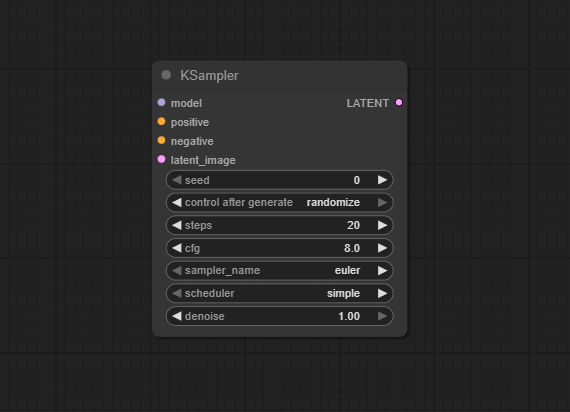
Official Documentation Link
https://comfyui.dev/docs/guides/Nodes/ksampler/
Inputs
| Parameter | Data Type | Input Method | Default |
|---|---|---|---|
| model | Object | Model loader node output | — |
| latent_image | Tensor | Node input/connection | — |
| positive | Embedding | Prompt conditioning input | — |
| negative | Embedding | Prompt conditioning input | — |
| steps | Integer | Numeric field/slider | 20 |
| cfg | Float | Numeric field/slider | 7.0 |
| sampler_name | String/Option | Dropdown (e.g., "euler", "ddim", "dpmpp_2m") | euler |
| scheduler | String/Option | Dropdown (optional, varies by sampler) | automatic |
| denoise | Float | Numeric field/slider | 1.0 |
| seed | Integer | Numeric field | Random |
| start_at_step | Integer | Numeric field | 0 |
| end_at_step | Integer | Numeric field | steps |
Outputs
| Output Name | Data Type | Description |
|---|---|---|
| latent | Tensor | The sampled latent tensor after denoising (ready for decoding) |
Usage Instructions
Add a KSampler node to your workflow. Connect a model loader (e.g., Load Diffusion Model), latent_image source, and positive/negative prompts (conditioning nodes). Set steps, sampler type, scheduler (if applicable), and CFG as desired. Optionally, adjust denoise strength, seed, and start/end step for advanced use cases. Connect the latent output to a decoder or image node to visualize results. Run the workflow—the node will perform the diffusion process and send results to downstream nodes.
Advanced Usage
Use non-default samplers for experimental results or speed optimizations. Set start/end steps to focus denoising on part of the process or for multi-stage workflows. Chain multiple KSamplers for techniques such as upscaling, face correction, or "inpainting" by masking and resampling regions. Apply controlled cfg/denoise values to fine-tune image adherence to the prompt or realism. Combine with scheduler/sampler plug-ins (see alternatives below) for custom iterative or adaptive sampling strategies.
Example JSON for API or Workflow Export
{
  "id": "ksampler_1",
  "type": "KSampler",
  "inputs": {
    "model": "@load_diffusion_model_1",
    "latent_image": "@emptysd3latentimage_1",
    "positive": "@conditioning_positive_1",
    "negative": "@conditioning_negative_1",
    "steps": 30,
    "cfg": 7.5,
    "sampler_name": "dpmpp_2m",
    "scheduler": "automatic",
    "denoise": 1.0,
    "seed": 1337,
    "start_at_step": 0,
    "end_at_step": 30
  }
}
Tips
- Lower steps and denoise for faster but less detailed images; higher for maximum quality/detail.
- Experiment with samplers (“euler”, “dpmpp_2m”, “heun”, etc) for different artistic results.
- Use a fixed seed for reproducible generations, random for creative exploration.
- If image output is blurry, try higher CFG or more steps.
- For upscaling, mask/region workflows, adjust start/end steps for partial denoising control.
How It Works (Technical)
KSampler uses diffusion-based algorithms to iteratively update a latent tensor over a set number of steps. It uses the loaded model, prompt conditioning, and configuration parameters to introduce controlled noise and denoise the tensor into a targeted output. The workflow parameters (sampler, scheduler, seed, etc.) determine the noise schedule and sample transformation dynamics, thereby controlling the style, quality, and reproducibility of the result.
Github Alternatives
- Efficiency Nodes for ComfyUI – Includes KSampler (Efficient), KSampler Adv. (Efficient), and KSampler SDXL (Eff.) with live previews and batch testing.
- WanMoeKSampler for ComfyUI – Specialized KSampler nodes for Wan Mixture of Expert models, including high/low noise expert routing.
- Sampler LCM Alternative Nodes – Custom LCM-based sampler, cycle, and scheduler for advanced generative testing and workflow integration.
Videcool workflows
The KSampler node is used in the following Videcool workflows:
FAQ
1. Which sampler is best for photorealism or speed?
Euler and DPM samplers strike a good balance; experiment as some are better optimized for speed or quality based on model format.
2. How do I make results reproducible?
Set a fixed seed and keep parameters consistent; KSampler outputs will be deterministic.
3. Can I chain multiple samplers in one workflow?
Yes, you may use multiple KSamplers for refining, upscaling, or different image regions.
Common Mistakes and Troubleshooting
Unmatched model and sampler types can cause issues—always use compatible model/sampler pairs for your workflow version (e.g., SDXL/SD1.5). Insufficient VRAM is a common problem; reduce batch size, image size, or steps if you run out of memory. Inappropriate parameter combinations may cause dull, blurry, or failed outputs. Leaving seed randomized may cause loss of reproducibility—fix seeds as needed. Workflow errors can occur; reconnect nodes if you encounter broken pipelines after updates.
Conclusion
KSampler is a core node for any ComfyUI workflow, translating prompt and model input into visually compelling images by harnessing robust, customizable diffusion sampling methods. Its flexibility supports both straightforward and advanced generative pipelines in creative AI.