
EmptyAceStepLatentAudio
The EmptyAceStepLatentAudio node initializes an empty latent audio tensor specifically for ACE-Step powered generative audio pipelines in ComfyUI. It provides a silent, structured starting point so workflows can reliably generate, transform, or enhance audio using diffusion or latent-based methods.
Overview
EmptyAceStepLatentAudio creates a zero-filled latent representation (tensor) compatible with ACE-Step and advanced generative audio models. By defining duration and batch size, you specify the shape and scale of your latent audio “canvas.” This node is foundational for workflows where you want to begin from silence or a blank latent context, ensuring deterministic, reproducible results in downstream audio synthesis, transformation, or conditioning.
Visual Example
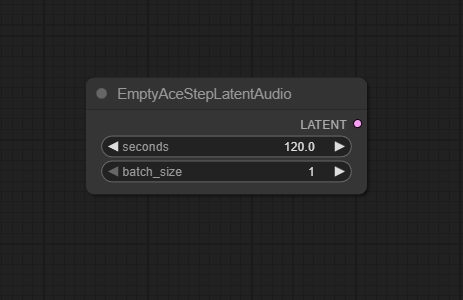
Official Documentation Link
https://comfyui-wiki.com/en/tutorial/advanced/audio/ace-step/ace-step-v1
Inputs
| Parameter | Data Type | Input Method | Default |
|---|---|---|---|
| seconds | Float | Numeric input | 5.0 |
| batch_size | Integer | Numeric input | 1 |
Outputs
| Output Name | Data Type | Description |
|---|---|---|
| latent_audio | Tensor | Zero-initialized latent space tensor for ACE-Step compatible audio workflows |
Usage Instructions
Add the EmptyAceStepLatentAudio node as the entry point for your audio workflow.
Set seconds to your desired output duration (in seconds). Set batch_size for single or batched audio generation.
Connect the latent_audio output to downstream nodes (such as ACE-Step decoders, transformations, or conditioning nodes).
Run the workflow; the node will output a compatible blank latent tensor for further synthesis or manipulation.
Advanced Usage
Pair with ACE-Step, Stable Audio, or custom diffusion models for research, testing, or compositional sound design. Use batch mode for parallel audio stream generation. Combine with VAEDecodeAudio, ConditioningStableAudio, or region masking nodes for complex, controllable tasks. Integrate into multi-modal (audio + video or text) creative pipelines in advanced ComfyUI graphs.
Example JSON for API or Workflow Export
{
  "id": "ace_step_latent_audio_1",
  "type": "EmptyAceStepLatentAudio",
  "inputs": {
    "seconds": 10.0,
    "batch_size": 2
  }
}
Tips
- Longer durations or higher batch sizes will require more system memory/VRAM—tune based on hardware.
- Always match
secondsandbatch_sizeto your decoder and model expectations for smooth integration. - Use the node to initialize “silent” regions when prepping segmentation, inpainting, or guided tasks.
- Label and group batch outputs for organized downstream processing in complex workflows.
How It Works (Technical)
This node allocates a multi-dimensional tensor (usually zero-filled) of shape [batch_size, channels, length] (where length is
determined from seconds). The tensor is tagged to indicate its latent audio nature, ensuring ACE-Step and compatible pipelines
can operate on it. All further generative, inpainting, or conditioning nodes treat this tensor as their foundational workspace.
Github Alternatives
- ComfyUI-EmptyHunyuanLatent – Nodes for creating empty Hunyuan/FLUX/ACE-Step compatible latent spaces and audio/video support.
- ComfyUI_AceNodes – Suite of custom ACE-related nodes, including latent audio and compositional generation for images, video, and audio.
- ComfyUI-LatentSync-Node – Latent audio and video synchronization, supports advanced latent generation and manipulation including for ACE-Step and ByteDance models.
- top-100-comfyui – Curated top nodes for image, audio, and video generative workflows, including EmptyLatentAudio derivatives.
Videcool workflows
The Load Diffusion Model node is used in the following Videcool workflows:
Videcool workflows
The Clip Text Encode (Positive Prompt) node is used in the following Videcool workflows:
FAQ
1. Can this node create latents for any duration?
Yes, up to VRAM or system memory limits—set de>seconds as needed for your application.
2. Is the batch size limited?
Only by available resources—use smaller values for lower-powered systems.
3. Do I need this for every ACE-Step workflow?
Yes, unless you're inputting pre-existing latent audio; this is the "blank canvas" for generative tasks.
Common Mistakes and Troubleshooting
Setting duration or batch too high for system memory can cause issues—lower values to fit hardware limits. Forgetting to connect the output to a decoder/sampler leaves data unusable in workflow. Using with non-compatible models can cause problems—verify ACE-Step support for best results. Failing to label/group batch outputs for complex downstream processing can lead to disorganized workflows.
Conclusion
EmptyAceStepLatentAudio is a crucial utility for initializing silent, structured latent spaces in ACE-Step and modern generative audio workflows. It supports innovation in music, sound design, and multimodal projects, serving as the foundation for any advanced audio pipeline in ComfyUI.