
Empty Latent Hunyuan3D v2
The Empty Latent Hunyuan3D v2 node creates an empty latent tensor with the correct layout and scale for Hunyuan3D‑2.0, providing a configurable starting point for text‑ or image‑conditioned 3D generation workflows in ComfyUI.
Overview
Empty Latent Hunyuan3D v2 is a utility node that initializes a zero‑filled latent compatible with the Hunyuan3D v2 model’s expected spatial resolution and internal channel structure. It is generally placed at the beginning of a 3D pipeline, where its output is consumed by Hunyuan3D sampler / renderer nodes that turn the latent into multi‑view images or mesh‑like 3D representations. By exposing resolution- and batch‑related controls, it helps creators balance detail, output size, and VRAM usage while keeping the rest of the workflow unchanged.
Visual Example
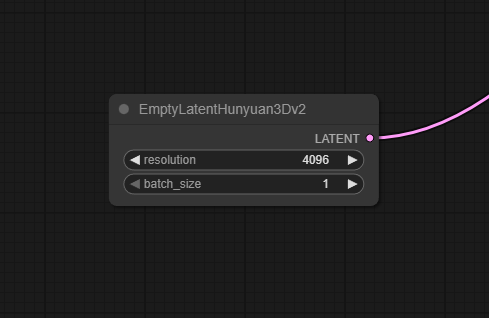
Official Documentation Link
https://www.instasd.com/comfyui/custom-nodes/comfyui/emptylatenthunyuan3dv2
Inputs
| Parameter | Data Type | Input Method | Default |
|---|---|---|---|
| width | INT | Numeric field / slider | 1024 |
| height | INT | Numeric field / slider | 1024 |
| views | INT | Numeric field / slider (number of camera views) | 8 |
| batch_size | INT | Numeric field / slider | 1 |
Outputs
| Output Name | Data Type | Description |
|---|---|---|
| latent | LATENT | An empty (zero‑initialized) latent tensor shaped for Hunyuan3D v2, ready to be filled by Hunyuan3D generation or refinement nodes |
Usage Instructions
Insert the Empty Latent Hunyuan3D v2 node at the start of a Hunyuan3D‑2 workflow, before your main Hunyuan3D sampler / generator node. Configure width and height to match the desired per‑view image resolution, set views to the number of angles you want the model to generate (for example 6–8 for turntable‑style views), and adjust batch_size if you intend to generate multiple 3D objects in parallel. Connect the latent output directly into the Hunyuan3D v2 model node that expects an input latent; then wire prompts, camera settings, and other conditions as usual.
Advanced Usage
In advanced setups, you can derive width, height, or views from helper nodes
or math utilities to dynamically adapt 3D resolution based on available VRAM or downstream rendering targets.
For example, use smaller latents for draft previews and switch to larger resolutions for final renders, all by
feeding different values into this node. When building pipelines that share a single Hunyuan3D model between
multiple branches, you can create several Empty Latent Hunyuan3D v2 instances with different resolutions
(for close‑up detail vs. global shape) and combine their resulting renders in post‑processing. The node also
pairs well with 3D figurine or product‑shot workflows that rely on fixed, reproducible camera rings, because the
views parameter lets you standardize multi‑view coverage per asset.
Example JSON for API or Workflow Export
{
   "id":"empty_latent_hunyuan3d_v2_1",
   "type":"EmptyLatentHunyuan3Dv2",
   "inputs":{
      "width":1024,
      "height":1024,
      "views":8,
      "batch_size":1
   }
}
Tips
- Start with moderate resolutions (for example 768–1024) and a low
batch_sizeto test stability before pushing to higher resolutions for final assets. - Increase
viewsonly as far as needed; more views give better 3D coverage but raise memory and compute cost. - Use separate workflows or presets for “preview” and “final” settings so you can quickly switch between fast iteration and high‑quality output.
- If you see out‑of‑memory errors during Hunyuan3D sampling, first lower
batch_size, then reduce resolution or views. - Document the latent settings (width, height, views) alongside your Hunyuan3D checkpoints to keep multi‑project pipelines consistent.
How It Works (Technical)
Empty Latent Hunyuan3D v2 allocates a tensor filled with zeros (or an equivalent neutral initialization) whose
dimensions match the Hunyuan3D v2 model’s latent space: typically a batch dimension, a view dimension, one or more channel
dimensions, and spatial height and width scaled to the internal downsampling ratio used by the model.
The node computes the latent spatial size from the requested resolution, taking into account Hunyuan3D’s internal stride so that
subsequent convolutions, attention blocks, and 3D structure encoders receive tensors with valid shapes. This latent is then passed
on unchanged until the Hunyuan3D generator writes structure and appearance into it during sampling.
Github alternatives
- ComfyUI‑EmptyHunyuanLatent – the original GitHub project offering Empty Hunyuan latent nodes for HunyuanVideo and Hunyuan3D, including variants for video and different resolutions.
- EmptyHunyuanLatent (ComfyAI.run) – hosted version of the same node family with documentation and examples for Hunyuan 3D and video workflows.
- EmptyLatentHunyuan3Dv2 – RunComfy – a catalog entry with ready‑made workflows demonstrating how to combine the node with native Hunyuan3D‑2 pipelines.
FAQ
1. Why do I need an “empty latent” for Hunyuan3D v2?
Hunyuan3D operates directly in its own latent space rather than starting from a 2D image, so it needs an initialized latent tensor;
this node creates one with the correct shape and resolution.
2. What resolution should I choose?
Use lower resolutions (for example 768 or 1024) while exploring prompts or layouts, and move to higher resolutions only when your
hardware can handle it and you are ready for final, high‑detail outputs.
3. Can I use this latent with non‑Hunyuan3D models?
No; it is specifically shaped for Hunyuan3D v2 and will usually not match the latent expectations of other 2D or 3D diffusion models.
Common Mistakes and Troubleshooting
A common mistake is setting width, height, or views too high for the available VRAM, causing out‑of‑memory errors or very slow sampling; in that case, reduce either the resolution or batch size. Another pitfall is attempting to feed this latent into non‑Hunyuan3D nodes, which may report shape mismatches or silently produce broken outputs—keep this latent within Hunyuan3D‑aware parts of the graph. If the model errors with dimensionality or stride mismatches, verify that you are using a compatible Hunyuan3D v2 checkpoint and that your resolution respects any documented minimum or multiple‑of‑N constraints.
Conclusion
Empty Latent Hunyuan3D v2 is a small but crucial building block for Hunyuan3D‑2 workflows in ComfyUI, providing a correctly sized, tunable latent canvas that lets artists and developers control resolution, views, and batching while keeping the overall 3D pipeline clean and modular.