
LatentOperationTonemapReinhard
The LatentOperationTonemapReinhard node applies Reinhard tonemapping to latent image tensors in ComfyUI workflows, optimizing dynamic range and perceptual contrast before decoding or further processing. Designed for high dynamic range workflows, it ensures a more natural and visually appealing output from diffusion pipelines.
Overview
LatentOperationTonemapReinhard is used to perform perceptual dynamic range compression ("tonemapping") on latent tensors produced by other nodes, such as samplers or encoders. It uses the Reinhard algorithm, a well-known HDR tonemapping method, to map the potentially wide range of values in the latent space to a normalized domain. This step is especially helpful for controlling highlight, shadow, and overall contrast in images synthesized by generative models, promoting photorealism and avoiding blown-out or washed-out results. The node typically sits after the denoising sampler, and before VAE Decode or output nodes.
Visual Example
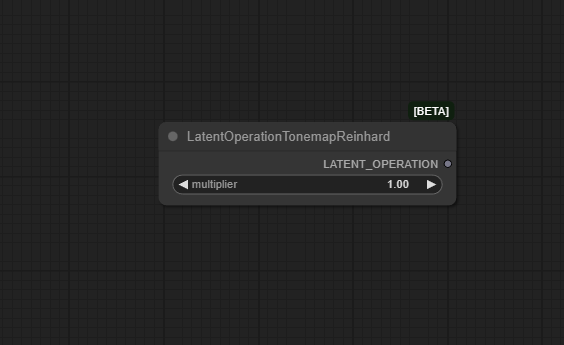
Official Documentation Link
https://comfyai.run/documentation/LatentOperationTonemapReinhard
Inputs
| Fields | Example Values | Explanation |
|---|---|---|
| multiplier | 1.2 | This multiplies the effect of the tonemapping, adjusting overall scene brightness. |
Outputs
| Fields | Example Output | Explanation |
|---|---|---|
| LATENT_OPERATION | Tonemapped Data | Contains the adjusted latent image data suitable for final rendering. |
Usage Instructions
To use the LatentOperationTonemapReinhard node in a typical workflow,
connect its latent input to the output of a sampler (for example, KSampler) or
any node producing a latent tensor. Adjust the multiplier to control overall intensity or contrast,
and percentile for highlight/shadow capping. The output, tonemapped_latent, should then be connected to a decoder node such as VAE Decode;
you can also chain additional post-processing for further effects. This workflow enables HDR-like results, greater image realism, and consistent contrast handling.
Advanced Usage
LatentOperationTonemapReinhard can be paired with other latent modification nodes (such as normalization, rescaling, or style transfer) for highly customized image generation. Adjust the de>multiplier and de>percentile to fine-tune the perceptual outcome for each image. In multi-step diffusion, you can insert tonemapping between denoising stages to maintain detail and prevent value clipping. For batch generation or automated pipelines, experiment with adaptive percentile values to bring out optimal contrast in diverse image sets.
Example JSON for API or Workflow Export
{
  "id": "tonemap_reinhard_1",
  "type": "LatentOperationTonemapReinhard",
  "inputs": {
    "latent": "@ksampler_1",
    "multiplier": 1.2,
    "percentile": 85.0
  }
}
Tips
- Start with default values and adjust
multiplierfor more vivid or subdued results. - Higher
percentilevalues ensure highlight details are preserved; lower values increase shadow recovery. - Chain multiple tonemapping nodes for stepwise adjustment in complex workflows.
- Monitor downstream results (decoded images); excessive tonemapping may cause color drift or unnatural tones.
- This node is helpful for workflows where output images need normalized contrast for editing or publication.
How It Works (Technical)
The node takes a latent tensor and applies the Reinhard tonemapping formula to compress its dynamic range, using a specified multiplier to
scale overall values and percentile to avoid outlier clamping. This is accomplished by calculating a mapped value
for each tensor element, ensuring the output latent remains within bounds suited for decoding and downstream use.
The result is perceptually more balanced and suitable for image reconstruction or further latent domain operations.
Github Alternatives
- ComfyUI_ColorMod – Provides nodes for color, contrast, HDR, and tonemapping operations including Reinhard and other algorithms.
- ComfyUI-Latent-Modifiers – Powerful set of nodes to modify latent space, with controls for tonemapping (Reinhard, Arctan, Quantile, Gated) and other noise/contrast management.
- ComfyUI_experiments – Experimental custom nodes including tonemap methods and HDR remapping for advanced workflows.
- comfyui-node-collection – Large collection of custom nodes with latent processing including tonemapping options.
Videcool workflows
The LatentOperationTonemapReinhard node is used in the following Videcool workflows:
FAQ
1. What is Reinhard tonemapping?
Reinhard tonemapping is an algorithm for mapping HDR data to LDR domains, especially useful for compressing dynamic range while avoiding highlights or shadows from clipping.
2. When should I use the multiplier and percentile parameters?
Use multiplier to boost or reduce overall contrast; use percentile to set how aggressively tonemapping targets high/low values. Experiment to find your optimal setting.
3. Will this node improve all images?
It’s best for HDR or high-contrast latent tensors from generative models. Overuse may cause artifacts; always evaluate final visual output.
Common Mistakes and Troubleshooting
A common pitfall is setting the multiplier too high, resulting in unnatural colors or value overflows. Too low a percentile can cause flat-looking or underexposed images. Ensure the latent tensor is not already tonemapped or normalized by previous steps; unnecessary chaining may reduce effectiveness or cause color drift. Always preview the decoded output to confirm contrast and realism meet your expectations. If errors occur, verify that the input is a valid latent tensor and the parameter formats are correct.
Conclusion
LatentOperationTonemapReinhard is a key utility for quality assurance in AI-based image generation workflows, ensuring outputs maintain perceptual realism and effective dynamic range. Tonemapping with well-tuned parameters can transform washed-out latents into rich, photorealistic images ready for publication or further editing.