
Color Input (RMBG)
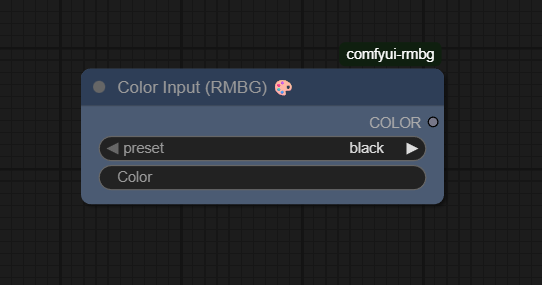
The Color Input (RMBG) node (AILab_ColorInput) provides a convenient way to define colors in ComfyUI‑RMBG workflows, supporting both preset named colors and custom hex codes and exposing them as a reusable COLOR value for background, overlay, and UI‑style operations.
Overview
Color Input (RMBG) is a lightweight utility node focused on color selection and management. It lets you quickly choose from a list of named presets or specify an exact hex color, then passes that value to downstream nodes that need a color parameter, such as background‑removal (RMBG) outputs, solid fills, or overlay effects. This centralizes color control so that consistent branding or theme colors can be reused across an entire workflow with minimal wiring.
Visual Example
Official Documentation Link
https://comfyai.run/documentation/AILab_ColorInput
Inputs
| Parameter | Description | Input Method | Default |
|---|---|---|---|
| preset | Selects a predefined color from a fixed palette (for example “red”, “blue”). | Dropdown list of named colors | None / first preset in list |
| color | Defines a custom color in hex format to override or extend the presets (for example #FF5733). |
Text field for hex string | Empty or #FFFFFF, depending on implementation |
Outputs
| Output Name | Description |
|---|---|
| COLOR | The resolved color (typically as a hex string) derived from the chosen preset or custom hex value, ready for use by downstream nodes. |
Usage Instructions
Add the Color Input (RMBG) node to your graph wherever a configurable color is needed, such as the background color input of an RMBG node or a compositing layer. Choose a preset if you want a quick standard color, or type a custom hex value into the color field for an exact shade; implementations typically treat a valid custom hex as overriding the preset. Then connect the COLOR output to any node input that accepts a color string, ensuring consistent use of that color across all connected components.
Advanced Usage
Advanced workflows often use multiple Color Input nodes to define a palette (for example, primary, secondary, accent,
and background colors) and then route these to different parts of a layered composite, making it easy to retheme the entire
workflow by adjusting only a few nodes. When combined with background‑removal pipelines, Color Input can dynamically
switch the background color behind isolated subjects, allowing quick iteration between white, brand‑colored, or dark
themes for product shots or portraits. In UI‑or brand‑design–oriented graphs, Color Input serves as a central configuration
point: expose its hex color field as an external parameter so non‑technical users can tweak colors
without editing the workflow’s internal wiring.
Example JSON for API or Workflow Export
{
   "id":"ailab_color_input_1",
   "type":"AILab_ColorInput",
   "inputs":{
      "preset":"red",
      "color":"#FF5733"
   }
}
Tips
- Use presets during early experimentation, then lock in final brand colors via the hex
colorfield for precise control. - Keep a dedicated Color Input node per logical role (for example “bg_color”, “accent_color”) so you can quickly identify and adjust color responsibilities in large graphs.
- When driving RMBG backgrounds, choose high‑contrast colors to easily inspect edge quality before switching to a production palette.
- Validate custom hex strings (for example
#RRGGBB) when copying from design tools to avoid runtime errors in nodes that parse the color. - Group Color Input nodes visually in the canvas and label them clearly so collaborators know which colors affect which parts of the pipeline.
How It Works (Technical)
Internally, Color Input (RMBG) reads the preset and color parameters and resolves them into a single canonical color value.
If a valid custom hex code is supplied in color, the node typically uses that directly; otherwise, it looks up the preset
name in a predefined map of named colors to hex values. The resulting hex string is then emitted as the COLOR output,
which downstream nodes may convert into numeric RGB(A) values or tensors as needed for fills, overlays, or shader parameters.
The node itself does no rendering; it simply normalizes user input into a predictable color representation.
Github alternatives
- ComfyUI-RMBG – main repository that includes AILab_ColorInput along with RMBG background‑removal nodes that commonly consume its COLOR output.
- ComfyUI_LayerStyle – offers advanced layer and style controls where colors from Color Input can be combined with gradients, strokes, and shadows for richer compositing.
- top-100-comfyui – an index of popular ComfyUI extensions, useful for discovering other color‑related utility nodes (such as palette generators or color‑ramp tools) to complement Color Input.
FAQ
1. Does the custom hex color override the preset?
In typical implementations, yes: if a valid hex code is provided in color, it is used as the output color;
otherwise, the node falls back to the selected preset.
2. What color format does the COLOR output use?
The COLOR output is usually a string in standard hex format (for example #RRGGBB), which downstream nodes then
parse and convert into numeric RGB(A) values as needed.
3. Can I animate or vary colors over time with this node?
Color Input itself is static per execution, but you can drive its parameters via scripting or external tooling, or
combine it with other nodes that blend between multiple COLOR inputs to create dynamic color changes.
Common Mistakes and Troubleshooting
A frequent mistake is entering an invalid hex string—such as missing the leading # or using non‑hex characters—which
can cause downstream nodes to error or silently revert to a default color. Another issue is assuming that changing the preset
will affect outputs when a custom color is still set; in most implementations the hex field takes precedence,
so clear or update it when you want the preset to apply. If colors appear unchanged in your final renders, verify that the
nodes you expect to react to COLOR are actually wired to the Color Input output and that they are configured to use that
parameter (for example, RMBG set to “solid color background” rather than “transparent”).
Conclusion
Color Input (RMBG) is a simple but effective building block for color‑driven workflows in ComfyUI, centralizing color selection for RMBG and compositing pipelines and enabling consistent, easily adjustable color schemes across both creative and production‑grade graphs.