
Load Fooocus Inpaint
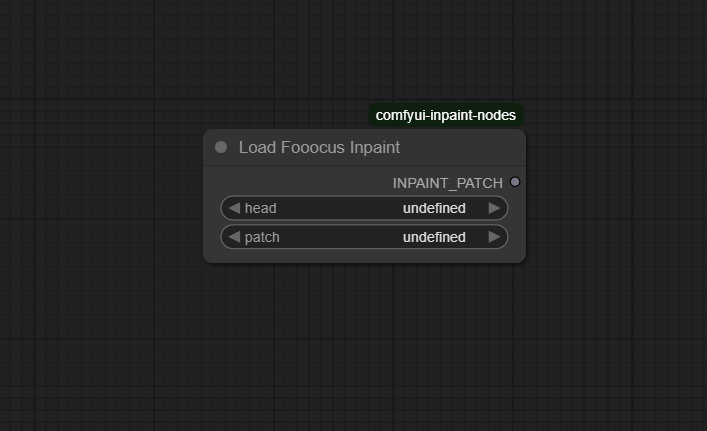
The Load Fooocus Inpaint node enables seamless integration of the Fooocus inpainting model in ComfyUI. This node is designed to load and initialize Fooocus-based inpainting checkpoints, making it easy to apply high-quality, flexible inpainting to any masked region or outpainting task—especially for workflows built around SDXL and similar models.
Overview
Load Fooocus Inpaint loads the Fooocus inpaint model by specifying both the head and patch components,
which together form a complete inpainting model compatible with the Fooocus framework. The node simplifies the technical setup of Fooocus inpaint
for SDXL and downstream nodes, giving creative professionals and researchers a robust foundation for prompt-based or mask-based inpainting.
It pairs with pre-processing nodes to prepare masks and is used as the model input for inpainting operations.
Visual Example
Official Documentation Link
https://github.com/Acly/comfyui-inpaint-nodes
Inputs
| Parameter | Data Type | Input Method | Default |
|---|---|---|---|
| head | String | Dropdown (filename in "models/inpaint") | fooocus_inpaint_head |
| patch | String | Dropdown (filename in "models/inpaint") | inpaint_v26.fooocus.patch |
Outputs
| Output Name | Data Type | Description |
|---|---|---|
| INPAINT_PATCH | Object | Loaded Fooocus inpainting model ready for application |
Usage Instructions
Download the Fooocus inpaint model components (head/patch) from the official Fooocus or community releases and place them in
your models/inpaint directory. In your ComfyUI workflow, insert the Load Fooocus Inpaint node and choose the
appropriate head and patch file names from the dropdown lists. Connect the INPAINT_PATCH
output to an Apply Fooocus Inpaint or equivalent node to use the Fooocus model for region or outpainting. Run the workflow
to leverage the Fooocus model’s inpainting strengths.
Advanced Usage
Combine Load Fooocus Inpaint with advanced pre-processing nodes (such as blur, fill, mask expansion, and compositing) to prepare precise and seamless inpainting regions. Test with different Fooocus patch versions for effects, compatibility, or inference speed. Integrate with SDXL, VAE Encode (for Inpainting), and mask compositing nodes for best results. Inpaint creatively across expanded or noncontiguous regions by chaining several Fooocus inpaint workflows together, or automate swapping between head/patch variants for ablation and research studies.
Example JSON for API or Workflow Export
{
  "id": "load_fooocus_inpaint_1",
  "type": "INPAINT_LoadFooocusInpaint",
  "inputs": {
    "head": "fooocus_inpaint_head",
    "patch": "inpaint_v26.fooocus.patch"
  }
}
Tips
- Always place both head and patch files in the
models/inpaintfolder before starting ComfyUI. - If model not detected, restart ComfyUI and check for filename correctness and format support.
- Use the regular (non-distilled) SDXL checkpoint if needing to convert it for Fooocus Inpaint—distilled/merged models are not supported.
- Test multiple patch versions to find your preferred blend of quality and speed for your use-case.
- Connect Fooocus inpaint models to their correct counterpart apply nodes, not generic inpaint loaders.
How It Works (Technical)
This node reads both “head” and “patch” Fooocus inpaint files from disk, verifies compatibility and integrity, and loads them as a composite model for use in downstream inpainting nodes. When called, the output model applies advanced inpainting algorithms—originally designed for Fooocus—to the masked regions in images, orchestrated by patch code and head weights, all inside the ComfyUI pipeline.
Github Alternatives
- comfyui-inpaint-nodes – Main suite for Fooocus, LaMa, MAT, with head/patch loader, region mask, blur, inpaint conditioning, and apply nodes.
- ComfyUI-Fooocus-Inpaint-Wrapper – Wrapper for Fooocus inpainting, aiming for streamlined use and fast update to core Fooocus releases.
- ComfyUI-LevelPixel – Node pack for atomic/advanced inpainting (including Fooocus), loaders, extensions, and compositing support.
Videcool workflows
The Load Fooocus Inpaint node is used in the following Videcool workflows:
FAQ
1. What type of models does Load Fooocus Inpaint support?
Fooocus SDXL-based inpaint models requiring both head and patch files (see release instructions).
2. Why isn’t my model detected in the dropdown?
Ensure the files are in models/inpaint, are not corrupted, and ComfyUI has been restarted.
3. Can I use distilled or merged checkpoints for Fooocus inpaint?
No—use the regular, non-distilled SDXL checkpoint for best compatibility and results.
Common Mistakes and Troubleshooting
Users commonly forget to copy both head and patch files into the correct directory, leading to model loading errors. Distilled or merged SDXL checkpoints are incompatible with Fooocus inpaint patching—always use standard releases. If performance is poor or the result has artifacts, try a different patch file or update to the latest Fooocus/ComfyUI versions. When the node does not appear, ensure the inpaint nodes extension is installed and enabled, and check for package requirements (such as OpenCV) for post-processing modes.
Conclusion
Load Fooocus Inpaint is your entry point for state-of-the-art inpainting in ComfyUI, bridging the world of Fooocus patching and flexible node-based workflows. Its reliable model loading and pairing capabilities make high-quality inpainting fast, creative, and robust for any user.