
FluxGuidance
The FluxGuidance node plays a central role in controlling prompt influence within FLUX-based workflows in ComfyUI. By adjusting guidance strength, users gain fine-tuned control over how much the text prompt steers image generation, balancing creativity and fidelity.
Overview
FluxGuidance modulates the impact of text conditioning on image generation within FLUX-enabled pipelines. It injects a guidance scale to the model during sampling, letting users emphasize or relax prompt adherence. This results in either more creative, loosely-interpreted images or closer prompt alignment, depending on the setting. It is typically placed between positive/negative prompt encoders and the model sampler (e.g. KSampler or a FLUX sampler node).
Visual Example
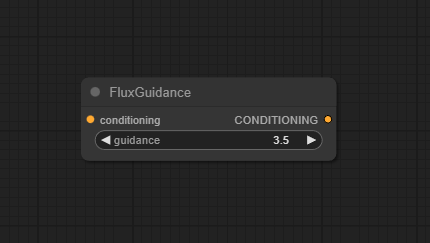
Official Documentation Link
https://comfyui-wiki.com/en/comfyui-nodes/advanced/conditioning/flux/flux-guidance
Inputs
| Parameter Name | Data Type | Function |
|---|---|---|
| conditioning | CONDITIONING | Input conditioning data, typically from previous encoding or processing steps |
| guidance | FLOAT | Controls the influence of text prompts on image generation, adjustable range from 0.0 to 100.0 |
Outputs
| Parameter Name | Data Type | Function |
|---|---|---|
| CONDITIONING | CONDITIONING | Updated conditioning data, containing the new guidance value |
Usage Instructions
Add a FluxGuidance node to your workflow. Connect positive and negative prompt embeddings from text encoder nodes (e.g., FluxTextEncode). Set guidance_scale to control how closely generation matches the prompt (higher = stronger adherence). Connect guided_conditioning output to a sampler or FLUX-compatible sampler node. Run your workflow—the node will modulate prompt influence based on your chosen setting.
Advanced Usage
Animate or vary guidance_scale across steps for creative workflow effects through dynamic guidance. Temporarily bypass or modulate guidance for certain workflow stages with conditional skipping. Pair with BasicScheduler or custom Flux models to achieve multi-stage or adaptive guidance for fine-tuned results.
Example JSON for API or Workflow Export
{
  "id": "flux_guidance_1",
  "type": "FluxGuidance",
  "inputs": {
    "positive": "@flux_text_encode_pos",
    "negative": "@flux_text_encode_neg",
    "guidance_scale": 6.0
  }
Tips
- Begin with the default guidance_scale (7.5), then adjust based on image quality and prompt fidelity desired.
- If output images become too generic, lower guidance_scale to improve creativity.
- Very high guidance can sometimes lead to artifacts or overfitting; tweak gradually.
- Works best specifically within Flux-based pipelines—ensure upstream/downstream node compatibility.
How It Works (Technical)
FluxGuidance takes positive and negative prompt embeddings, scales their influence using the guidance_scale parameter, and outputs modified embeddings. This amplifies or suppresses the effect of the prompt signal relayed to the sampler/model node, affecting the alignment between textual and visual output.
Github Alternatives
- ComfyUI-FluxSettingsNode – Combines FluxGuidance, sampler selection, scheduler, and random noise management, with tabbed configurations for advanced workflows.
- ComfyUI-Flux-Inpainting – Provides nodes wrapping multiple Flux models, inpainting/outpainting functionality, and integrated guidance control for FLUX pipelines.
- ControlAltAI Quality of Life Nodes – Efficiency node set for ComfyUI, including "Flux Region" and spatial/attention control nodes for fine-grained guidance.
Videcool workflows
The FluxGuidance node is used in the following Videcool workflows:
FAQ
1. Do I need FluxGuidance for every FLUX workflow?
It is strongly recommended for optimal prompt control, but some models may fall back on default values.
2. How is this different from CFG (Classifier-Free Guidance)?
FluxGuidance is tailored for the FLUX architecture and uses model-specific guidance, distinct from standard Stable Diffusion CFG nodes.
3. Can I automate or animate the guidance strength?
Yes, use workflow animation or keyframe nodes, or script changes in API-based workflows.
Common Mistakes and Troubleshooting
Not connecting compatible positive/negative embeddings can break prompt application. Setting guidance too high can result in artifacts or overstrict results—reduce scale incrementally. Using FluxGuidance outside of Flux models is a mistake; check your sampler/model compatibility. Forgetting to connect FluxGuidance output to the sampler means no effect on workflow.
Conclusion
FluxGuidance is the key node for nuanced text control in FLUX-powered image generation pipelines. By offering a single, adjustable handle on prompt influence, it empowers creators to balance fidelity and creativity for state-of-the-art visuals.