
LatentApplyOperationCFG
The LatentApplyOperationCFG node brings explicit control to classifier-free guidance (CFG) in ComfyUI by applying custom modifications to latent tensors based on positive and negative conditioning. This node is crucial for experimenting with guidance techniques and balancing creativity with fidelity in generative workflows.
Overview
LatentApplyOperationCFG enables direct manipulation of latents according to CFG principles, influencing how much the positive prompt (what you want) or negative prompt (what to avoid) affects the final image. Inserted between generation and decoding, this node lets you fine-tune image attributes and style adherence, serving as a key handle for exploration and research in conditioning control. It is typically paired with sampler and decoder nodes, and works in complex or experimental workflows requiring guidance scale modulation and conditioning logic.
Visual Example
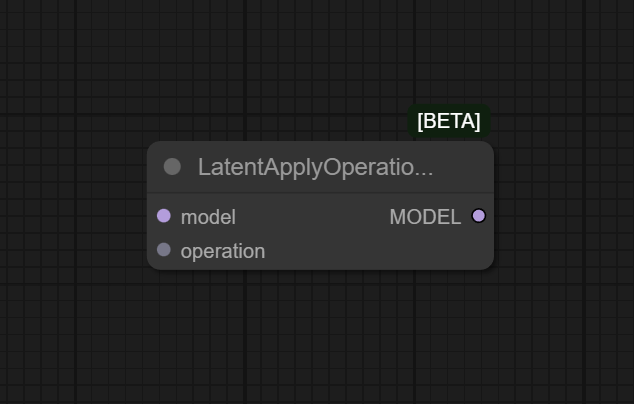
Official Documentation Link
https://comfyai.run/documentation/LatentApplyOperationCFG
Inputs
| Fields | Example Values | Explanation |
|---|---|---|
| model | Pre-trained ML model | The machine learning model whose latent space will be operated on. |
| operation | Scale Operation | The type of operation you wish to perform on the latent variables. |
Outputs
| Fields | Example Output | Example Output |
|---|---|---|
| model | Modified ML model | The model post-operation, reflecting changes in its latent structure. |
Usage Instructions
To use LatentApplyOperationCFG in your workflow, connect its latent input to a sampler or latent source.
Wire positive_conditioning and negative_conditioning from their respective encoding nodes. Set cfg_scale
to control prompt adherence—higher values make outputs more like your prompt, lower values increase creativity and diversity.
Connect the output latent to a decoder or further processing node. Run the workflow to test and tune classifier-free guidance effects on generative results.
Advanced Usage
Advanced users can chain multiple LatentApplyOperationCFG nodes to explore sequential or combinatorial guidance effects, test custom scale schedules for each denoising step, or alternate between various conditionings for style mixing. Pair with region-based conditioning or attention masking nodes for localized guidance, and combine with advanced samplers for research or high-control creative workflows. Batch process different cfg_scale values for grid search and analysis of prompt fidelity versus realism.
Example JSON for API or Workflow Export
{
  "id": "latent_cfg_1",
  "type": "LatentApplyOperationCFG",
  "inputs": {
    "latent": "@ksampler_1",
    "positive_conditioning": "@text_encode_positive_1",
    "negative_conditioning": "@text_encode_negative_1",
    "cfg_scale": 6.5
  }
}
Tips
- Use a cfg_scale between 6.0–8.5 for best balance of adherence and diversity in most diffusion workflows.
- Try lower cfg_scale (
2.0–4.0) for more abstract, creative, or surreal generations. - Use batch workflows or scripting to sweep the cfg_scale for rapid tuning and comparison.
- Always preview outputs after applying CFG operations—effects can be subtle or dramatic depending on prompt/model combo.
- CFG operations are especially important when generating highly guided or style-specific results.
How It Works (Technical)
The node computes a new latent tensor by applying the classifier-free guidance formula: combining noise predictions conditioned on positive and negative embeddings, weighted by the cfg_scale. The result is a latent that more closely aligns with desired features and suppresses undesired ones, ready for decoding into the final image or for further generative steps.
Github Alternatives
- comfyui-tooling-nodes – Miscellaneous processing nodes, region attn, tiled processing, and support for conditioning/fine tuning via custom latent operations.
- top-100-comfyui – Curated index with multitudes of latent and CFG operation nodes for advanced workflows.
- pre_cfg_comfy_nodes_for_ComfyUI – Nodes for prepping latent noise and embeddings before CFG, supporting chaining and customized guidance logic.
- ComfyUI-Latent-Modifiers – Additional advanced latent operation modules, including latent normalization, guidance, and more.
Videcool workflows
The LatentApplyOperationCFG node is used in the following Videcool workflows:
FAQ
1. What is classifier-free guidance (CFG)?
CFG is a technique where both positive and negative prompts are used to steer generative models, balancing semantic fidelity and creative
diversity through a scale parameter.
2. Where should I place LatentApplyOperationCFG in my workflow?
Typically after the sampler but before the decoder, or wherever you want to apply explicit guidance control to your latent data.
3. Can I use custom schedules or dynamic cfg_scale values?
Yes, pair with scripting nodes or batch grid nodes to automate cfg_scale changes for experimentation or research.
Common Mistakes and Troubleshooting
A frequent mistake is setting cfg_scale too high, which can cause overfitting, loss of diversity, or posterization artifacts in the output. Too low and the model ignores prompt details, resulting in unrelated or washed-out images. Input mismatches—using incompatible latent or conditioning tensors—can cause failures or nonsensical images. Always verify compatibility throughout the workflow and check for model-specific recommendations. If results look off, retest with standard cfg values and single changes per test run.
Conclusion
LatentApplyOperationCFG empowers users with explicit, fine-tuned conditioning control in ComfyUI, unlocking next-level prompt fidelity, creativity management, and research in generative AI workflows. Whether refining style or maximizing prompt adherence, it is vital for nuanced, high-performance pipelines.