
Load Checkpoint
The Load Checkpoint node is the most common entry point for loading diffusion models (such as Stable Diffusion, SDXL, and compatible models) in ComfyUI. It simplifies model selection, management, and integration for image generation workflows, initializing the model’s core weights and structure for downstream processing.
Overview
Load Checkpoint enables users to select and load pre-trained model checkpoints from the models/checkpoints
folder or extra paths. It supports automatic detection of available files, guessing configuration, and efficiently preparing models for
generation, editing, or analysis. By handling .ckpt, .safetensors, and other supported formats, it removes technical hurdles and allows
users to focus on workflow design and creative exploration. All major generative, upscaling, inpainting, or style transfer pipelines in
ComfyUI typically start with this node.
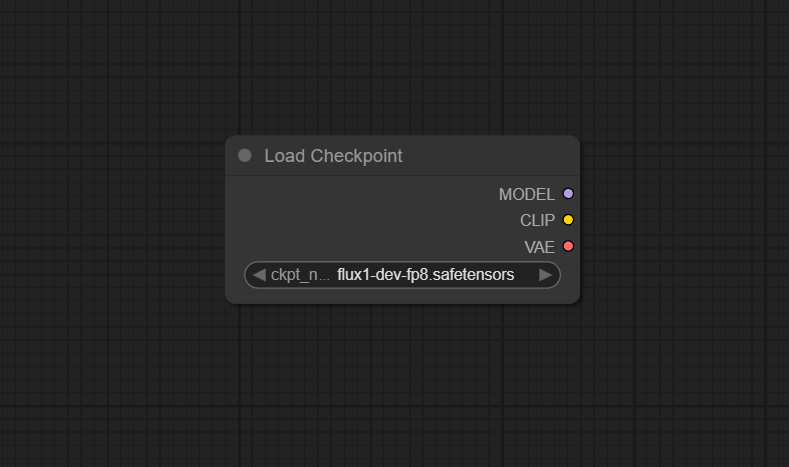
Visual Example
Official Documentation Link
https://comfyui-wiki.com/en/comfyui-nodes/loaders/checkpoint-loader-simple
Inputs
| Field | Comfy dtype | Description |
|---|---|---|
| ckpt_name | String | Specifies the name of the checkpoint to be loaded, determining which checkpoint file the node will attempt to load and affecting the node’s execution and the model that is loaded. |
Outputs
| Field | Comfy dtype | Description |
|---|---|---|
| model | MODEL | Returns the loaded model, allowing it to be used for further processing or inference. |
| clip | CLIP | Returns the CLIP model associated with the loaded checkpoint, if available. |
| vae | VAE | Returns the VAE model associated with the loaded checkpoint, if available. |
Usage Instructions
Add the Load Checkpoint node to your workflow as the first model loader. Choose a checkpoint file from the dropdown menu,
which will list all compatible model files placed in models/checkpoints. Once selected,
the node will load the model and expose outputs for the main generator, as well as CLIP and VAE models if included in the checkpoint.
Connect the model output to KSampler or similar nodes to begin image generation; connect clip and vae
to respective encoders/decoders if separated in your workflow.
Advanced Usage
For researchers or advanced users, the node can be chained with patching, LoRA, or merge nodes for custom checkpoint manipulation.
Use with extra_model_paths.yaml to add additional model directories. Pair with checkpoint config loader nodes or
memmapping extensions for faster loading and easier management of multiple models. You can override default config files for custom checkpoint architectures,
and use extracted CLIP and VAE components in multi-model or hybrid workflows. Batch script node selection to automate testing or A/B
comparisons across multiple checkpoints.
Example JSON for API or Workflow Export
{
  "id": "checkpoint_loader_1",
  "type": "CheckpointLoaderSimple",
  "inputs": {
    "ckpt_name": "sdxl_base_1.0.safetensors"
  }
}
Tips
- Place all model files (.ckpt, .safetensors, etc.) in
models/checkpoints/for auto-detection. - If the checkpoint doesn't appear in the menu, refresh the UI or restart ComfyUI.
- Large checkpoints may take time to load, especially on limited hardware.
- Use extra_model_paths.yaml to organize models across drives or folders.
- CLIP and VAE outputs help create flexible, plug-in workflows beyond just generation.
How It Works (Technical)
The node scans the configured checkpoints folder for available model files, loads the specified weights using PyTorch or other backend, and reconstructs the network architecture. If the checkpoint bundles CLIP and VAE submodules, these are extracted and exposed via separate outputs. The main model object is then ready for inference, generation, or further manipulation by downstream nodes, supporting modern SD/SDXL architectures, LoRA, Inpaint, and beyond.
Github Alternatives
- ComfyUI-checkpoint-config-loader – Advanced loader node for loading checkpoint configs from YAML; helpful for custom batch loading, automated config, and interop with ksampler parameterization.
- comfyui-checkpoint-extract – Extends extraction; lets you pull CLIP and VAE components directly from SDXL checkpoints after initial loading for reuse or repacking.
- ComfyUI-DiffusersLoader – Custom loader node for diffusers-format checkpoints (Hugging Face), streamlining support for new architectures such as PixArt, Kolors, and more.
- ComfyUI-TemporaryLoader – Loader node for on-the-fly download and memory-based checkpoint loading from any URL.
Videcool workflows
The Load Checkpoint node is used in the following Videcool workflows:
FAQ
1. Where do I place new model checkpoint files?
In the models/checkpoints/ folder of your ComfyUI installation, or extra paths defined in extra_model_paths.yaml.
2. Why isn’t my checkpoint file showing up?
Refresh the ComfyUI interface and confirm the filename extension is .ckpt or .safetensors. Restart if necessary.
3. Does this node support extracted CLIP and VAE?
Yes, if bundled in the checkpoint. Use separate outputs for explicit CLIP or VAE nodes in modular workflows.
Common Mistakes and Troubleshooting
Common pitfalls include placing files in the wrong directory, using unsupported formats, or forgetting to refresh/restart the interface after adding new checkpoints. Some community checkpoints may require special config files or patches. Very large checkpoints (>4GB) may take longer to load; watch memory use and adjust batch sizes or hardware if needed. If individual components (CLIP/ VAE) are missing, verify the checkpoint includes them; otherwise load those separately. Always check log output if model fails to load.
Conclusion
Load Checkpoint is the foundation of nearly every ComfyUI workflow, enabling fast, streamlined, and modular loading of generative AI models for art, restoration, upscaling, and research. By simplifying model management, it boosts productivity and opens up creative potential for all users.